
The client portal question you’re actually being asked
When a client asks, “Is there somewhere I can log in and see everything?”, they aren’t demanding a $20,000 custom software platform. They aren’t asking for custom user authentication, dark mode toggles, or white-labeled mobile apps. They are making a much simpler, human request: can I check on my project’s progress at 9:00 PM without sending an email and waiting until tomorrow for a response?
Understanding this distinction saves you thousands of dollars and months of unnecessary technical buildout. You don’t need dedicated portal software yet — you just need a visible window into your existing workflow.
What a lightweight portal needs to do
If your client communication system and offboarding and reporting cadences are solid, you know clarity beats complexity. Yet agency owners often spiral when the portal question arises, assuming visibility requires expensive specialized software or custom development.
In reality, a lightweight client portal only needs to accomplish three tasks: show current project status at a glance without translating internal jargon; provide centralized access to finalized deliverables and files so nobody has to resend a link; and require zero learning curve — if a client has to remember credentials or learn an unfamiliar sidebar, they will revert straight to emailing you.
Anything beyond these three functions — native payments, embedded messaging, complex approval engines — is scope creep for a small agency. A lightweight portal is a passive visual window keeping clients informed between scheduled syncs, not a communication replacement.
Airtable: polished interfaces, but the portal feature sits behind a paywall
Airtable is frequently recommended for client-facing setups because of its clean visual layer, Interface Designer. Testing it directly reveals a critical distinction most recommendations skip: building an interface and actually sharing it with a client are two different things.
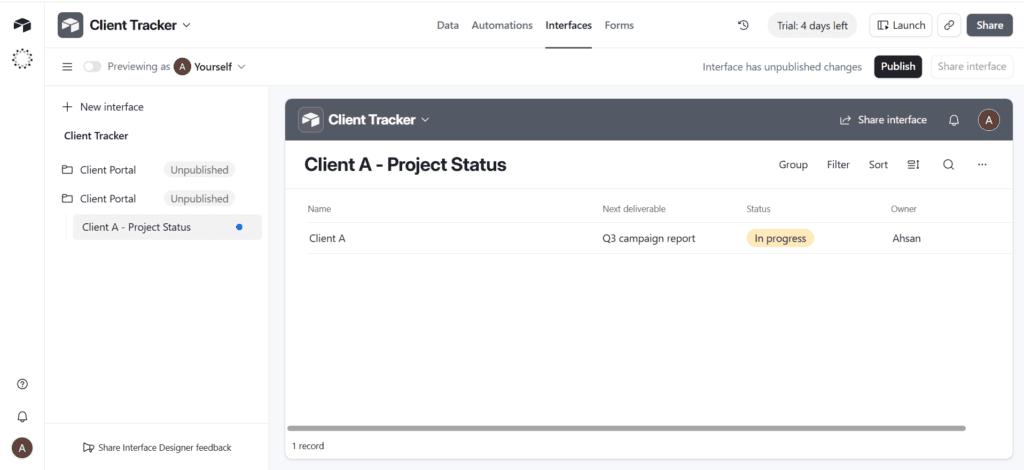
The build: created a central Client Tracker base with tables for projects, deliverables, and status. Opened Interface Designer from the base navigation and selected a layout combining summary cards with a filtered list of active deliverables. Formatted the canvas to hide internal fields like billing rates and private notes. Then, in the Share Interface menu, tried to invite an external client email — and hit the wall: interface-only sharing is an upgraded workspace feature.
The honest assessment: every plan, including Free, lets you design interfaces. Sharing an interface separately from the underlying base — without giving the client access to your raw records — is restricted to paid workspaces, starting at the Team tier around $20 per editor per month. On a true Free plan, any client you invite to view an interface has to be added as a collaborator on the underlying base itself, which exposes your entire schema, unhidden fields, and internal records. That defeats the purpose of building a portal in the first place. The Free plan also caps automations at 100 runs per month with a 1,000-record limit per base, which matters if your portal data updates automatically from other workflows.
Verdict: Airtable Interfaces look genuinely impressive, but unless you pay for Team tier or higher, you cannot securely isolate a client’s view from your internal data once the trial ends.
ClickUp: easy shared boards, but no fine-grained privacy
Rather than a dedicated portal or dashboard, sharing client progress in ClickUp in practice means granting external guest access to a shared Board view.
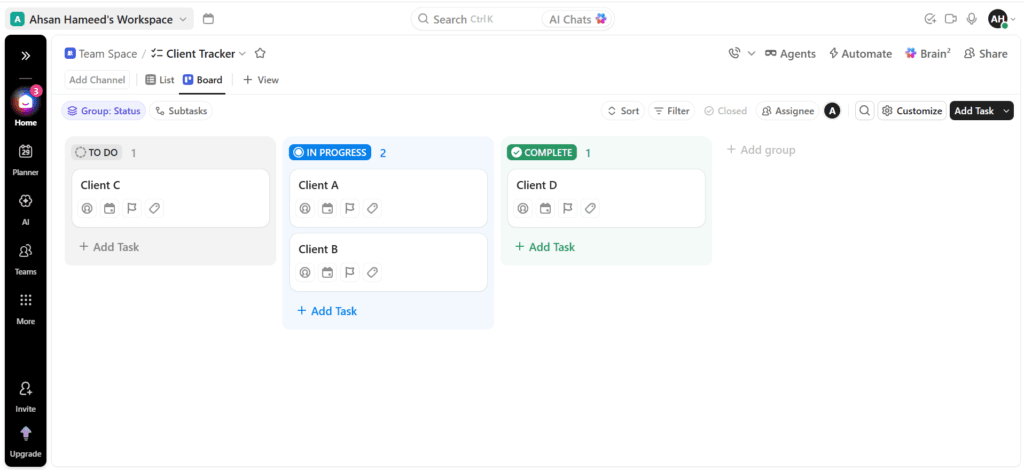
The build: organized an internal Client Tracker list with tasks grouped into To Do, In Progress, and Complete columns. Applied a standard Board view, choosing which task fields — due dates, assignees, tags — show on the card fronts. From there, the only sharing options are a public view link or adding the client as a view-only guest to that same board.
The honest assessment: ClickUp’s Board view has no way to hide individual custom fields or internal comments from a shared guest on a per-card basis. If a card carries budget figures, internal discussion, or dev notes, the client sees them — the same board your production team uses, with nothing stripped out. There is no native “client-facing card layout.” The only real workaround is maintaining two separate lists — an internal production list and a manually duplicated client-facing one — which introduces ongoing manual overhead and a real risk of the two drifting out of sync.
Verdict: ClickUp Board views work for agencies running a fully transparent, open-book relationship where the client seeing everything is welcome. They fail the moment you need a clean, sanitized view with internal fields kept out of sight.
Notion: the most viable free client portal
Notion remains the most flexible and genuinely free option for building an isolated client view, using a master database with a filtered linked view on a separate page.
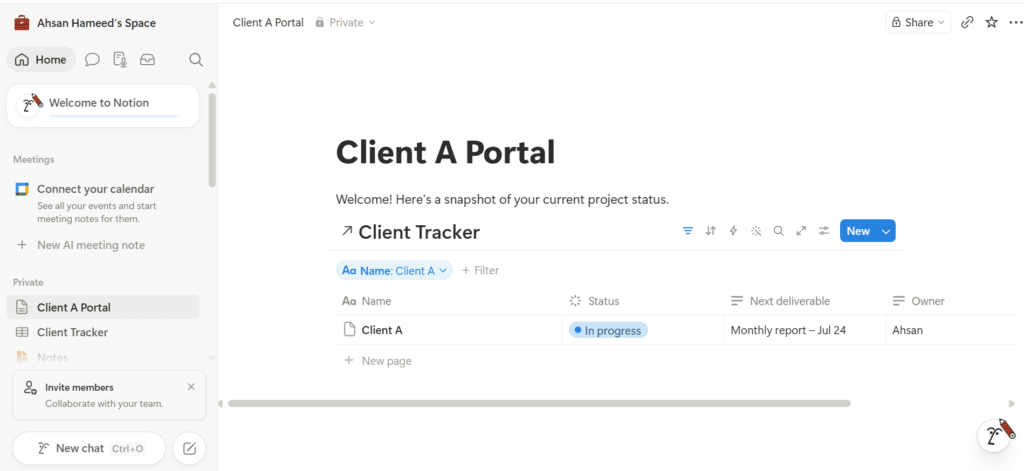
The build: a master Client Tracker database holds every client’s deliverables, tagged by Client Name, Status, and Target Date. A separate top-level page — Client A Portal — carries agency branding and a short welcome note. A linked database view embedded on that page points back to the master tracker, with a hard filter: Client Name equals Client A. Only the Client A Portal page itself gets shared with the client, set to Can View or Can Comment.
The honest assessment: because the client’s permission is scoped to that one page, they cannot see Client B’s records or the unfiltered master database — true isolation, not just a filtered view someone could accidentally widen. You can wrap the filtered view with custom welcome copy, embedded links, or static guidelines on the same page. The one real risk: a highly technical client with edit permissions could theoretically alter the filter if you grant edit access instead of view access — keeping access to Can View or Can Comment removes that risk entirely.
Verdict: Notion is the most functional, genuinely free client portal option of the three, with real permission isolation and no forced upgrade to get there.
When you actually need dedicated portal software
At some point, adapting existing tools into client portals stops being a clever cost-saver and starts being an administrative burden. Buying dedicated client portal software becomes the right call at three thresholds: high client volume — past roughly 15 active retainers, manually managing filtered views and access links across each client in Notion or Airtable creates real operational risk; required client-side interactivity — lightweight portals are built for passive viewing, and if your process needs native e-signatures, embedded payments, or structured uploads, forcing that into Notion or Airtable produces a clunky, degraded experience; and strict white-label branding — if enterprise clients expect your exact custom domain with no third-party platform branding visible anywhere, that requires dedicated software built for it.
Recognizing this threshold matters as much as the tool comparisons above — it stops you from over-engineering a stack that doesn’t need it yet, and it stops you from underbuilding once you’ve genuinely outgrown a Notion page.
The verdict, by situation
If your operational source of truth is already Airtable and you’re on the Team tier or higher: use Interface Designer. It’s the most polished, professional-feeling option of the three, with real data separation once you’re past the trial.
If you want the most functional free option available today: build a Notion Client Hub page with a filtered linked view. It takes about twenty minutes, provides genuine permission isolation, and costs nothing.
If your agency runs fully transparent, open-book client relationships: a shared ClickUp Board view works, provided you’re comfortable with the client seeing exactly what your internal team sees — including fields you might prefer stayed internal.
If you manage more than 15 active accounts and need client-side approvals, uploads, or payments: stop adapting existing tools and move to dedicated portal software built for agency workflows. Our stack audit is the place to start that evaluation with a full accounting of what you already pay for.
The honest limitations
Every option in this article covers status and deliverable viewing — none of them handle client-side interactivity like native payments, e-signatures, or multi-step approval flows without bolting on separate middleware, which tends to break more than it solves for a small agency. If your delivery model genuinely requires those, the dedicated-software threshold above applies now, not eventually.
All tool features, pricing tiers, and platform limits in this article were verified directly — including the Airtable trial banner and the ClickUp screen-shared board — in July 2026. Interface Designer, guest permissions, and free-tier limits are exactly the kind of feature that shifts between plan tiers without much notice; check the current state of whichever tool you choose before building on it. For the full three-way comparison these tools came from, see our Notion vs ClickUp vs Airtable breakdown, and for how a lightweight portal fits into the rest of your client-facing system, our client communication guide covers the channel and decision-log side of the same relationship.
