
The billing tool nobody switches until something breaks
Most agency owners do not select their billing software through a rigorous evaluation process. Instead, they adopt whatever platform their bookkeeper recommended when filing their first tax return, or whatever basic invoice generator was easiest to set up when their first client signed.
They stay on that default tool for years — enduring manual data entry, awkward payment collection steps, or unexpected fee spikes — until an operational threshold forces a crisis. That breakdown usually arrives in one of three ways: reaching a strict client cap on a lower tier, attempting to scale retainer invoicing across a larger account team, or trying to manage international payments without destroying profit margins in foreign exchange conversion fees.
Evaluating your options before reaching a breaking point prevents costly software migrations and ensures your billing architecture scales alongside your sales pipeline.
What each tool actually is
To choose the right billing engine for your agency, you must first recognize that FreshBooks, QuickBooks Online, and Xero represent three fundamentally different approaches to business finance:
- Invoicing-First Service Engine (FreshBooks): Built from the ground up for service providers, small agencies, and freelancers. Its focus is getting invoices out the door quickly, tracking project time, and managing client retainers with minimal accounting complexity.
- Full Double-Entry Accounting Standard (QuickBooks Online): Designed as a comprehensive financial suite for small-to-medium businesses. Invoicing is simply one component of a platform built for general ledger integrity, tax compliance, and CPA collaboration.
- Cloud-Native Collaborative Accounting Engine (Xero): Built for scaling businesses and international firms. It offers full double-entry accounting with flat, seat-unlimited pricing models and multi-currency conversion capabilities.
FreshBooks — Invoicing-first simplicity for service teams
What it’s for & core architecture
FreshBooks prioritizes client-facing billing velocity over complex accounting features. If your agency revenue comes primarily from recurring monthly retainers, hourly project work, or fixed-scope deliverables, FreshBooks provides a straightforward plan structure built around client count rather than transaction complexity.
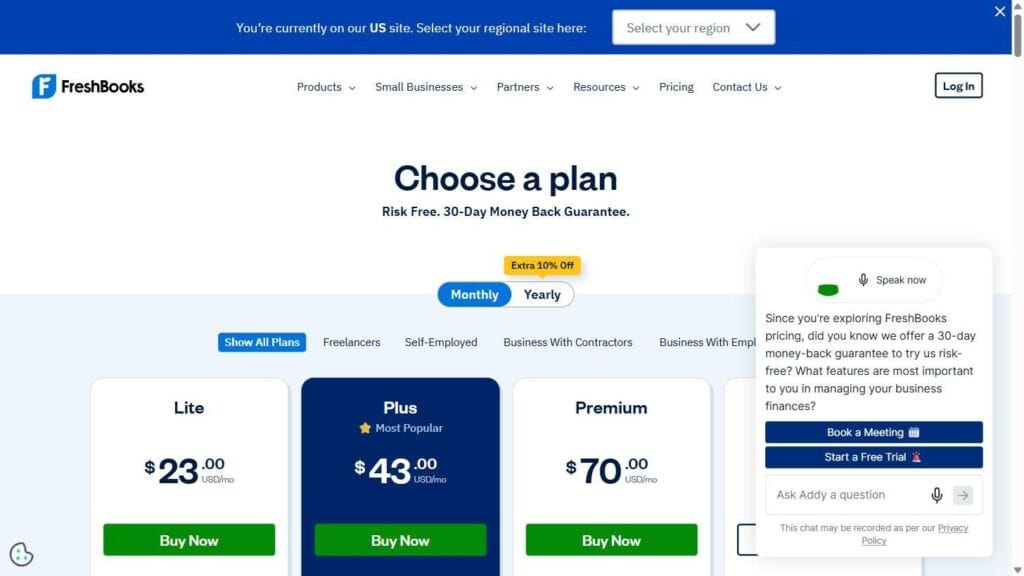
FreshBooks live pricing page, August 2026
Dated pricing and tier breakdown (August 2026, verified live)
- Lite Plan ($23.00/month USD): Bill up to 5 active clients. Includes expense tracking, estimates, and card processing.
- Plus Plan ($43.00/month USD, most popular): Bill up to 50 active clients. Unlocks recurring client retainers and accounting reports.
- Premium Plan ($70.00/month USD): Bill unlimited clients. Adds project profitability tracking and automated receipt scanning.
- A fourth, custom-priced tier (“Talk to a Consultant”) is available for higher-volume agencies.
FreshBooks tier feature and client-cap breakdown
Payment collection and recurring billing
FreshBooks’ own plan pages list payment collection via credit and debit cards, ACH bank transfer, Apple Pay, Google Pay, and Buy Now Pay Later, with recurring client retainers unlocked starting on the Plus tier — confirmed directly from the live pricing page’s feature list. We weren’t able to verify the actual invoicing workflow or client-facing portal firsthand: the trial signup hit an “email already registered” error before reaching the product, so claims about setup speed or portal polish should be treated as unverified until tested directly.
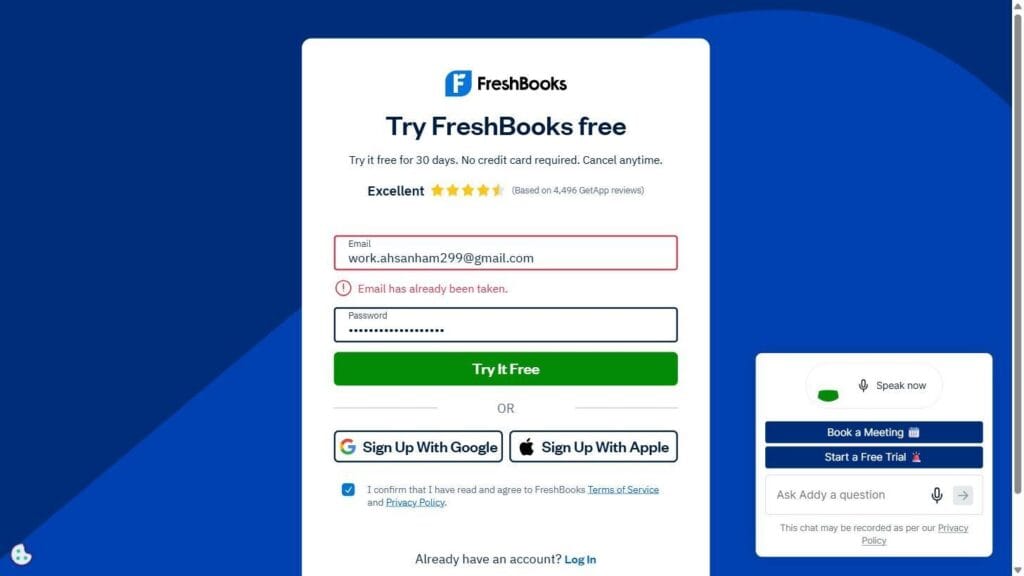
FreshBooks trial signup — blocked by an existing account, not completed
Make.com and Zapier availability
FreshBooks’ own AppStore did not surface a Make.com listing under a search for either “Make” or “Make.com” — the first returned 37 unrelated apps, the second returned zero. No direct Zapier listing surfaced either, though FreshBooks’ store structure may simply organize integrations differently than Xero’s or QuickBooks’ do. This is a real, confirmed asymmetry against the other two tools, covered in full below.
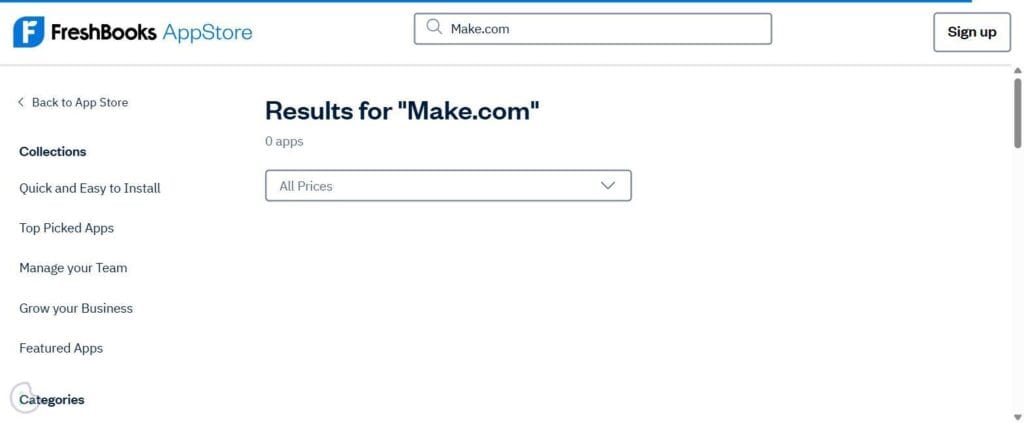
FreshBooks AppStore — “Make.com” search, 0 results
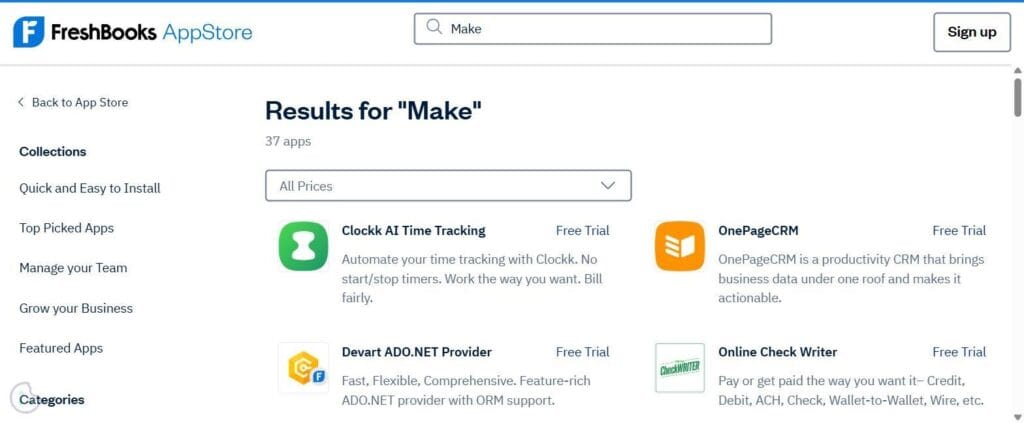
FreshBooks AppStore — “Make” search, 37 results, none of them Make.com
QuickBooks Online — Comprehensive accounting depth with a genuine free tier
What it’s for & core architecture
QuickBooks Online (QBO) is the default accounting software for many North American small businesses. It’s built for agencies whose primary operational need is financial reporting, tax preparation, and integration with external CPAs or fractional CFOs.
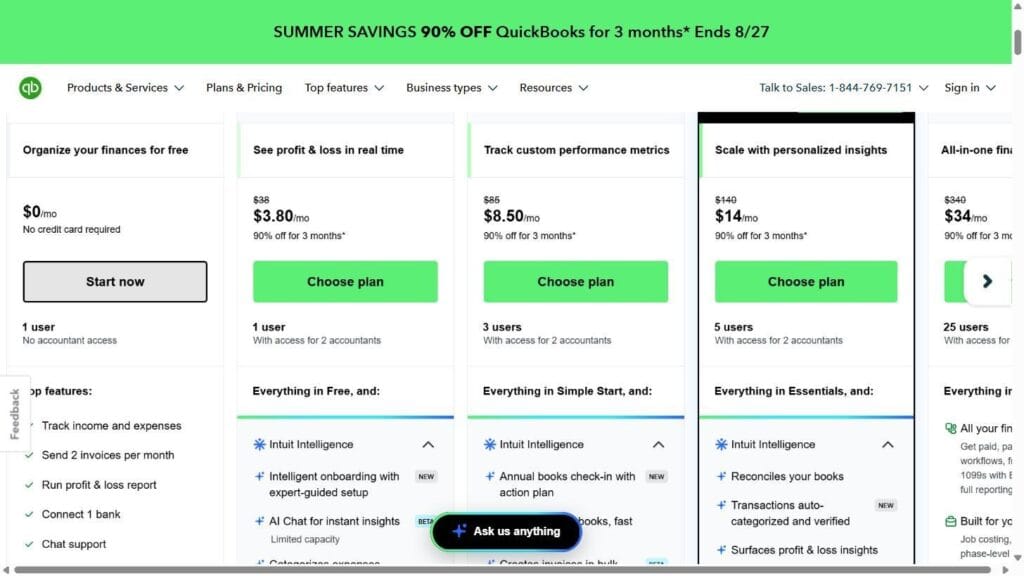
QuickBooks Online live pricing, showing the permanent Free plan
Dated pricing and tier breakdown, including the free-tier finding (August 2026, verified live)
An earlier pass through this project assumed QuickBooks Online had no permanent free tier — that assumption was wrong. Live pricing confirms a genuine $0/month plan (“Organize your finances for free”):
- Free Plan ($0/month): 1 user seat, no credit card required to start, 1 connected bank account, basic profit & loss reporting, and up to 2 invoices per month.
- Simple Start ($38.00/month regular; $3.80/month promotional): 1 user seat plus 2 accountant seats.
- Essentials ($85.00/month regular; $8.50/month promo): 3 user seats plus 2 accountant seats.
- Plus ($140.00/month regular; $14.00/month promo): 5 user seats plus 2 accountant seats, adds job costing and inventory.
- Advanced ($340.00/month regular; $34.00/month promo): 25 user seats and workflow automation tools.
The 2-invoice-per-month cap makes the Free plan unworkable as an active agency’s billing tool, but it’s a genuine zero-cost option for testing integrations before committing to a paid tier.
Signup friction: no card, but phone verification is mandatory
QuickBooks’ free tier genuinely requires no credit card to start. It does, however, require a valid phone number for SMS/call verification before the account can be created — this wasn’t completed in this research pass, so it’s reported as a signup requirement, not a completed test of the product itself.
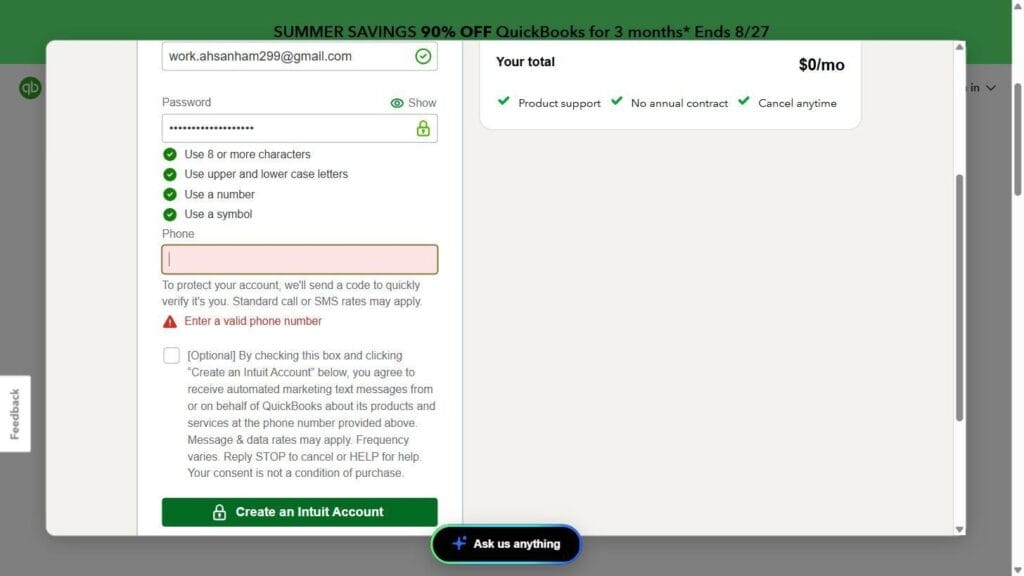
QuickBooks free-tier signup — mandatory phone verification, no card required
Make.com and Zapier availability
Unlike FreshBooks, QuickBooks’ own App Store surfaces both Zapier and Make as direct, top-level results for a “Zapier” search.
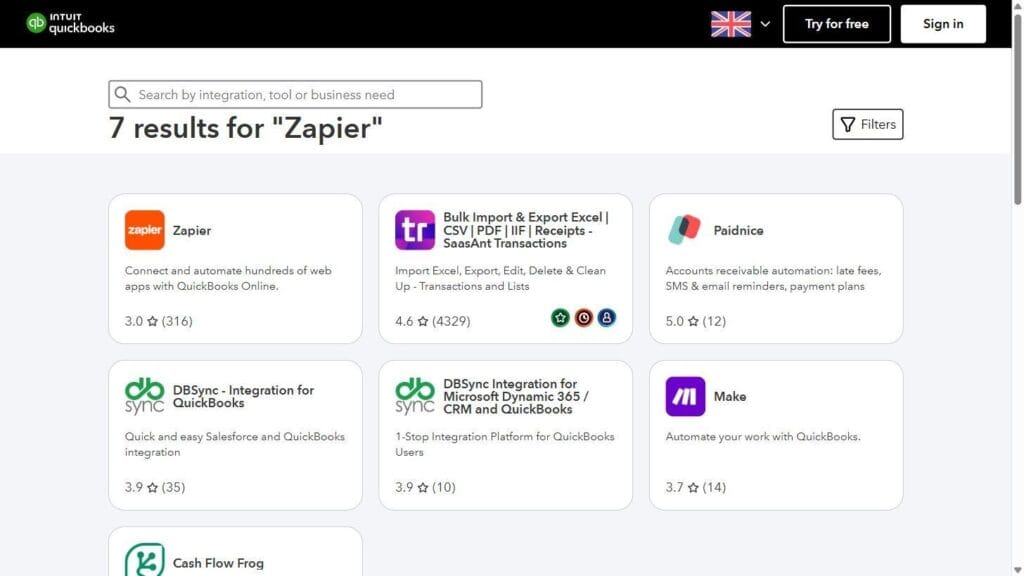
QuickBooks App Store — Zapier search results, including a direct “Make” listing
Xero — Unlimited users and multi-currency scalability
What it’s for & core architecture
Xero is designed for scaling agencies, multi-partner firms, and international service providers. Rather than charging extra as your team grows, Xero includes unlimited user seats across all its plans.
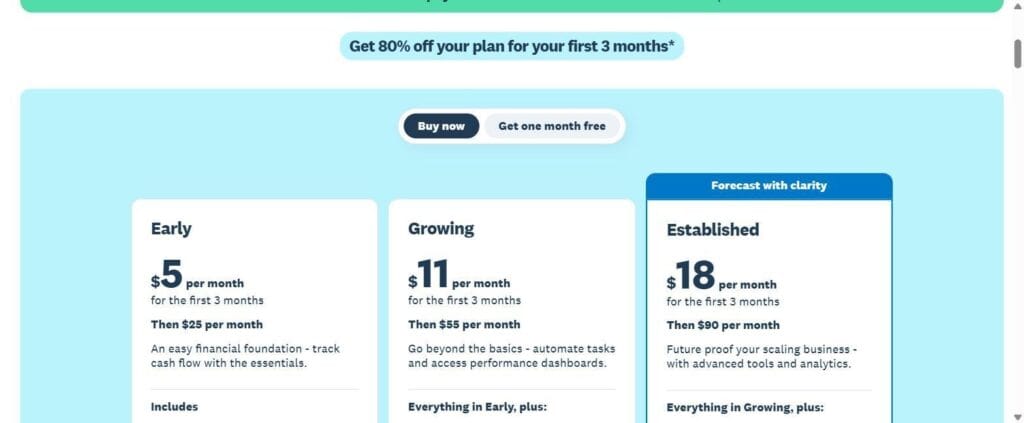
Xero live pricing page, August 2026
Dated pricing and tier breakdown (August 2026, verified live)
- Early Plan ($25.00/month regular; $5.00/month for first 3 months): send quotes and up to 20 invoices, enter 5 bills per month.
- Growing Plan ($55.00/month regular; $11.00/month for first 3 months): unlimited invoicing and bill entry, automated bank reconciliation.
- Established Plan ($90.00/month regular; $18.00/month for first 3 months): everything in Growing, plus multi-currency support, project tracking, and expense claims.
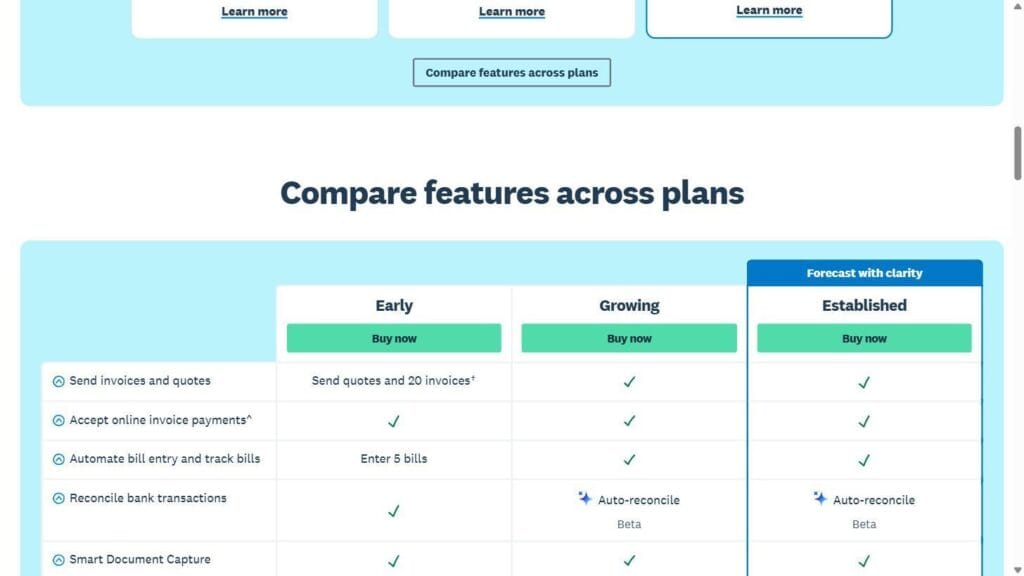
Xero feature and invoice/bill cap comparison across tiers
Multi-user and multi-currency value proposition
- Unlimited team seats: while QuickBooks Online charges up to $340/month to grant system access to 25 users, Xero includes unlimited user access across all its plans.
- Multi-currency handling: the Established tier ($90/mo) adds multi-currency support, extending well beyond a single-currency setup — the specific number of supported currencies wasn’t verified and is left out rather than repeating an unconfirmed figure.
Signup friction: no card, but phone verification is mandatory here too
Xero’s trial also requires no credit card to start, and also requires a valid phone number to complete signup — the same friction point as QuickBooks, and one not present (or at least not reached) in the FreshBooks flow, which failed earlier in the process for an unrelated reason.
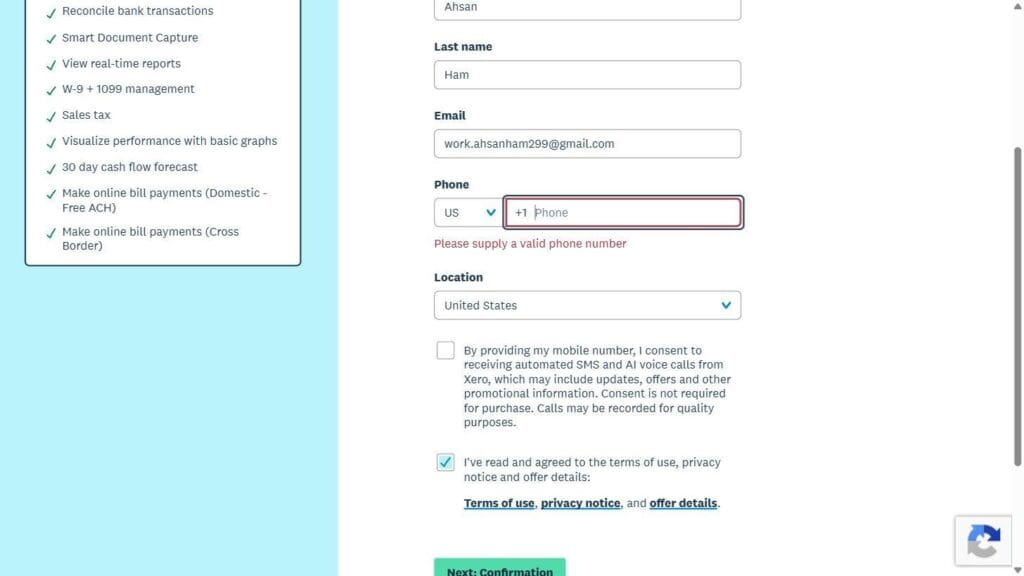
Xero trial signup — mandatory phone verification field
Make.com and Zapier availability
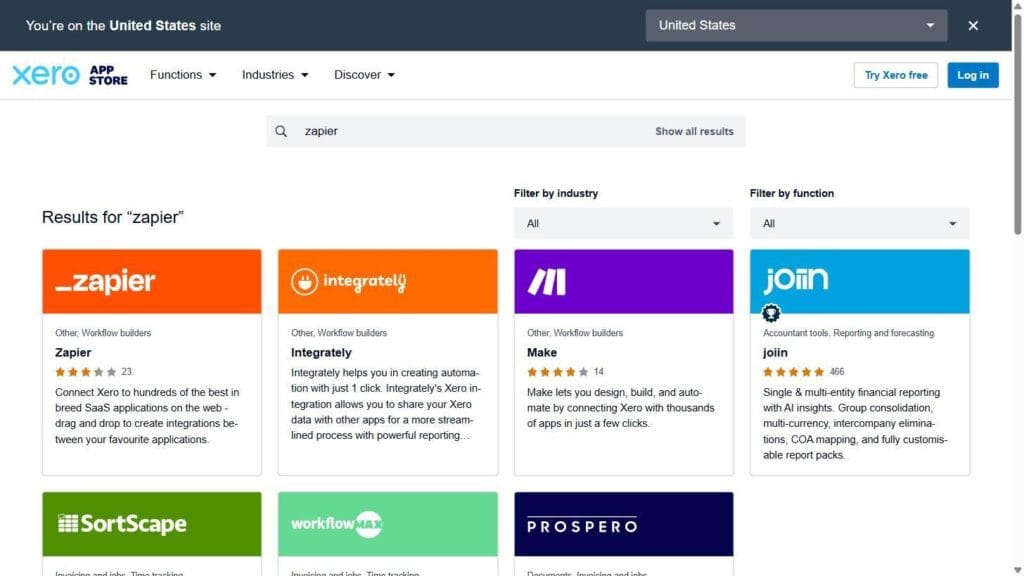
Like QuickBooks, Xero’s own App Store surfaces a direct “Make” listing alongside Zapier in search results — confirmed, not assumed.
Xero App Store — Zapier search results, including a direct “Make” listing
Side-by-side comparison table
| Feature / Dimension | FreshBooks | QuickBooks Online | Xero |
| Primary category | Invoicing-first service platform | Comprehensive accounting suite | Collaborative cloud accounting |
| Starting regular price (2026) | $23/mo (Lite, 5 clients)$43/mo (Plus, 50 clients) | $0/mo (Free, 2 invoices/mo)$38/mo (Simple Start) | $25/mo (Early, 20 invoices)$55/mo (Growing, unlimited) |
| User seat limits | Charged per additional staff seat | Capped by tier (1, 3, 5, or 25 users) | Unlimited users on all plans |
| Client volume caps | Yes — 5 clients (Lite), 50 (Plus) | No explicit cap on paid plans | No explicit cap from Growing up |
| Free tier / card required | 30-day trial, no card (test signup blocked by “email already registered” before completion) | Permanent $0 plan, no card — but phone verification required to sign up | 30-day trial, no card — but phone verification required to sign up |
| Multi-currency support | Available on select higher tiers (unverified) | Available on Plus tier ($140/mo) and above | Included from Established tier ($90/mo) |
| Make.com / Zapier listed in tool’s own app store | Not found under “Make,” “Make.com,” or a direct “Zapier” tile | Both confirmed as direct top results | Both confirmed as direct top results |
Which one fits your stack
Selecting the right software depends on your agency’s team structure, accounting setup, and client billing model.
Scenario A: Small service agency focused on rapid invoice delivery and low setup friction
If your agency has under 10 employees, bills clients primarily in a single domestic currency, and wants a plan structure built around client count rather than accounting complexity, FreshBooks is worth strong consideration. One caveat worth weighing before committing: if your billing workflow depends on connecting to Make.com or Zapier, FreshBooks’ own AppStore didn’t surface either integration, unlike Xero and QuickBooks. Confirm that connection works for your specific setup rather than assuming it — this is a real gap, not a formality.
Scenario B: Agency with complex financial reporting and external CPA management
If your agency relies on an external fractional CFO or requires strict double-entry ledger auditing, QuickBooks Online remains the industry default — most accounting firms are already fluent in its reporting formats. Its free tier is also a genuine zero-cost way to test API and automation connections before committing to a paid plan, credit-card-free, though signup does require phone verification.
Scenario C: Scaling international agency with multiple team members
If your agency works with international clients across multiple currencies or needs to grant billing visibility to numerous project managers, Xero’s unlimited-seat structure and Established-tier multi-currency support make it the strongest fit of the three, at a lower per-seat cost than QuickBooks once your team grows past a handful of users.
The honest limitations
First, SaaS pricing structures and tier limits change regularly. Vendors routinely modify client caps, adjust introductory promotions, and move features across tiers. Per our 90-day SaaS audit framework, revisit this comparison’s numbers every three months rather than treating them as fixed.
Second, don’t assume Make.com or Zapier support from a tool’s general popularity. FreshBooks’ own AppStore doesn’t surface a native Make.com listing under either “Make” or “Make.com,” and no explicit Zapier listing surfaced either — a real contrast to Xero and QuickBooks, both of which list Make and Zapier directly in their own app marketplaces. Worth saying plainly: this isn’t just a listing omission — connecting Make.com to FreshBooks in practice has been rockier than with Xero or QuickBooks. Check Make.com’s own app directory for a FreshBooks connector before you commit a billing automation to any of these platforms.
Finally, no billing software can substitute for internal financial discipline. Upgrading your invoicing platform will improve payment collection flows and document presentation, but it will not resolve issues caused by missing contract terms, late invoice approvals, or poor payment tracking. Clear financial policies remain essential for maintaining healthy agency cash flow.
