The proposal tool decision nobody makes carefully
Most agency owners do not choose a proposal tool through a deliberate evaluation process. Instead, they default to sending custom PDF attachments or Google Drive links via email until proposal volume increases. Once manual document creation becomes an obvious bottleneck, they rush out and purchase a platform based on brand recognition, aggressive social ad campaigns, or a peer’s casual recommendation.
Selecting a proposal tool based on popularity rather than operational alignment is a costly mistake. If your proposal tool does not fit your agency’s existing tech stack, it will either create redundant data silos or force your team into clunky manual workarounds.
What each tool actually is
To evaluate PandaDoc, Dubsado, and HoneyBook accurately, you must first understand that they belong to two fundamentally different software categories:
- Document Specialists with CRM Integrations (PandaDoc): These tools specialize entirely in document creation, custom variable mapping, dynamic pricing tables, legal e-signatures, and real-time recipient tracking. They do not attempt to be your primary client database, project manager, or billing platform. Instead, they attach to your existing CRM (such as HubSpot or Pipedrive) to handle the document stage of your sales pipeline.
- Client-Management Platforms with Built-In Proposals (Dubsado & HoneyBook): These platforms are all-in-one operational suites built primarily for boutique service providers, freelancers, and small agencies. They combine lightweight CRM capabilities, invoicing, automated payment schedules, client portals, and contract signing into a single interface. Proposals in these systems are not standalone documents — they are integrated steps within an end-to-end client management flow.
Recognizing this structural divide is the first step toward making the right choice for your agency.
PandaDoc — Document specialist with CRM integration
What it’s for & core architecture
PandaDoc is built for agencies that already have an established front-of-funnel tech stack and require advanced document creation, CPQ (Configure, Price, Quote) capabilities, and granular recipient analytics. Rather than managing client relationships inside PandaDoc, your sales team uses it to turn CRM data into polished, legally binding proposals in seconds.
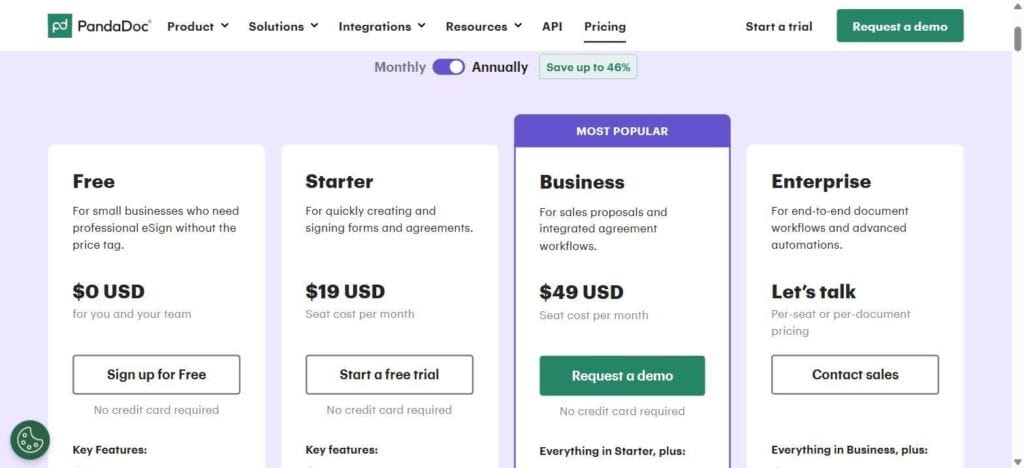
PandaDoc live pricing page, 2026
Dated pricing and tier breakdown (2026 pricing, verified live)
PandaDoc operates on a per-seat subscription model with annual billing discounts:
- Free Plan ($0): Basic e-signing for small businesses, no credit card required.
- Starter Plan ($19/seat/month, billed annually): For quickly creating and signing forms and agreements.
- Business Plan ($49/seat/month, billed annually): For sales proposals and integrated agreement workflows — includes everything in Starter, plus expanded features.
- Enterprise Plan (custom, “Let’s talk”): For end-to-end document workflows and advanced automations — includes everything in Business, plus per-seat or per-document pricing options.
Template & e-signature depth
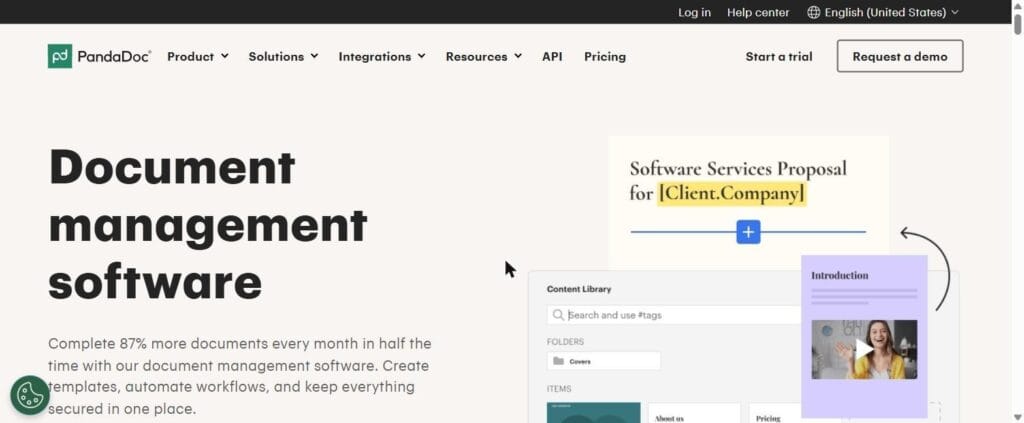
PandaDoc document management / content library page
PandaDoc excels at structured document assembly. Its drag-and-drop editor supports a searchable content library of reusable templates and blocks, dynamic pricing tables (including optional line items and variable quantities), content locking (preventing reps from editing legal terms), and multi-party signature routing. Recipient analytics reveal when a prospect opens a proposal and how they move through it.
CRM integration depth
PandaDoc’s primary strength is its deep synchronization with dedicated CRMs. As demonstrated in our PandaDoc lead-to-proposal automation build, PandaDoc can ingest variables directly from HubSpot deal records via Make.com. When a client signs a PandaDoc proposal, the platform can update the deal stage in your CRM and attach the completed document to the client’s record.
Dubsado — Flat-rate client management platform
What it’s for & core architecture
Dubsado is designed for boutique agencies and solo operators who want a single, highly customizable system to handle client intake, proposals, contracts, invoicing, and basic workflow automation.
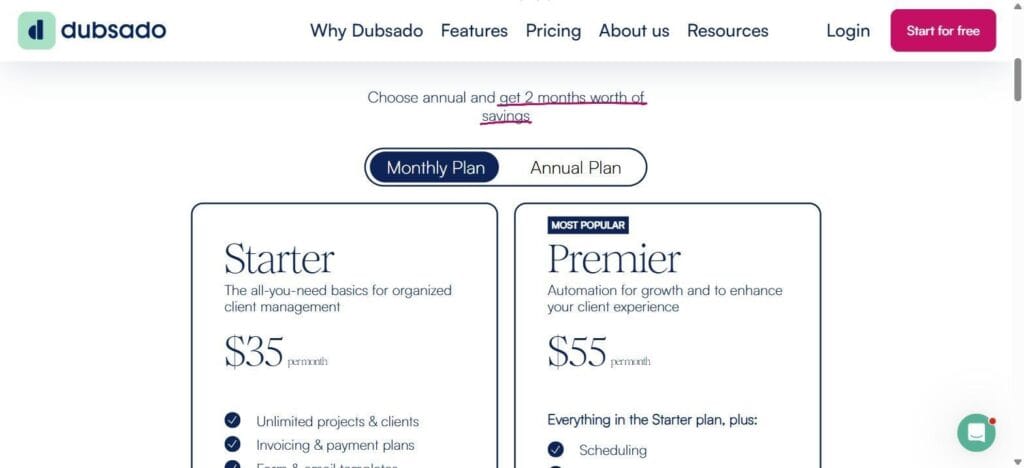
Dubsado live pricing page, 2026
Dated pricing and tier breakdown (2026 pricing, verified live)
Dubsado uses a flat-rate platform fee model rather than charging per individual proposal or active client:
- Starter Plan ($35/month): The all-you-need basics for organized client management — unlimited projects & clients, invoicing & payment plans, form & email templates.
- Premier Plan ($55/month): Everything in Starter, plus scheduling, automated workflows, and public proposals.
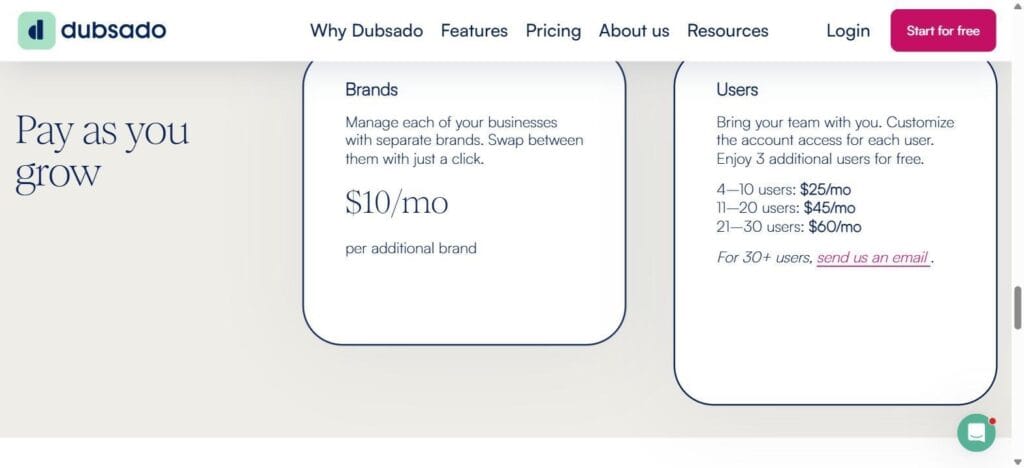
Dubsado additional user and brand pricing
Dubsado includes 3 additional users free, then scales in tiers: $25/month for 4–10 users, $45/month for 11–20 users, $60/month for 21–30 users. Managing more than one business under one login costs an additional $10/month per brand.
Template & e-signature depth
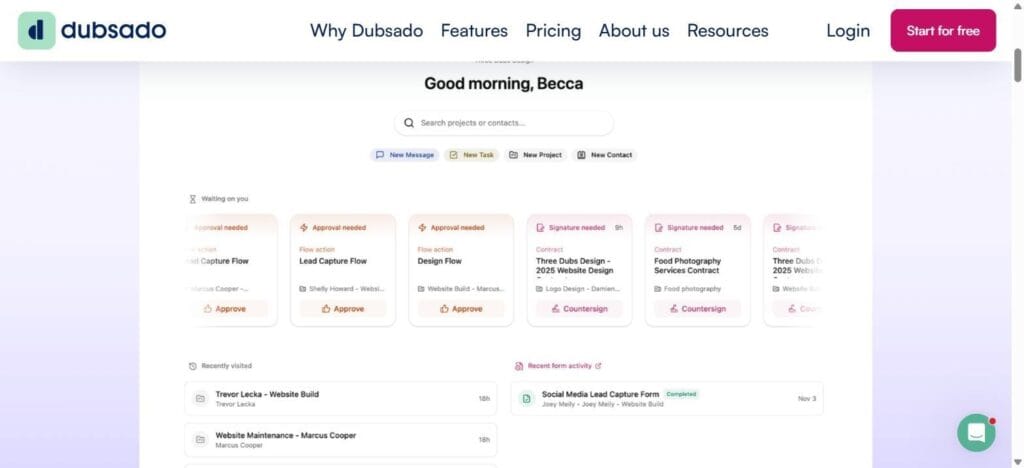
Dubsado client management dashboard
Dubsado allows agencies to bundle proposals, contracts, and initial invoices into a single, sequential client viewing experience. A prospect can select their service package, review and sign the contract, and pay an initial deposit as one continuous flow. Its document design editor relies on a block-based web layout that carries a steeper setup curve than a standard word processor.
Setup curve and customization depth
Dubsado offers extensive customization for client workflows, email templates, and portal styling, but configuring its rule-based automation engine requires meaningful initial time investment. Because Dubsado acts as your client management database, you build your intake forms, contract templates, and payment schedules directly inside its ecosystem.
HoneyBook — Guided client management for fast execution
What it’s for & core architecture
HoneyBook targets small agencies, creative studios, and independent consultants who need an intuitive, visual platform to manage client communications, proposals, contracts, and payments with minimal setup friction.
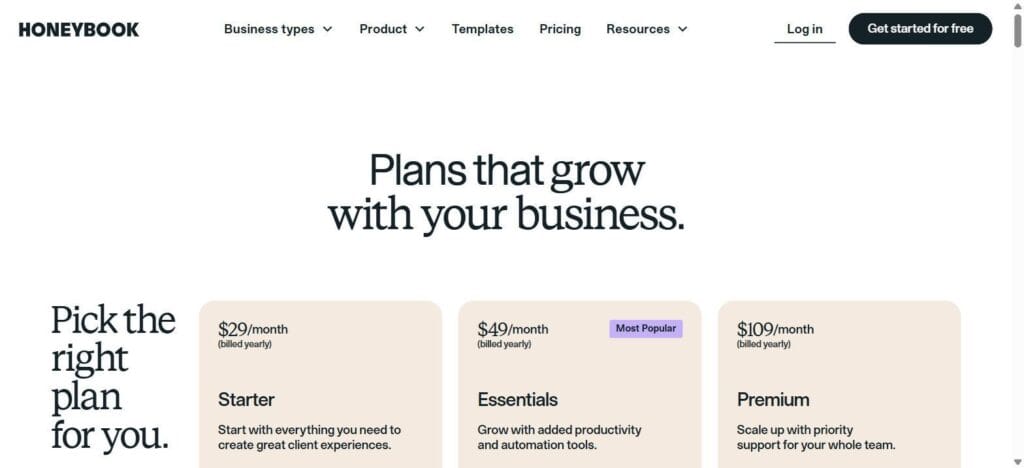
HoneyBook live pricing page, 2026
Dated pricing and tier breakdown (2026 pricing, verified live)
HoneyBook prices by feature access and team-member allowance, billed annually:
- Starter Plan ($29/month, billed yearly): Start with everything you need to create great client experiences.
- Essentials Plan ($49/month, billed yearly): Grow with added productivity and automation tools.
- Premium Plan ($109/month, billed yearly): Scale up with priority support for your whole team.
Monthly billing runs higher across all three tiers; HoneyBook markets the annual rates shown above as the standard comparison point.
Smart Files and flow speed
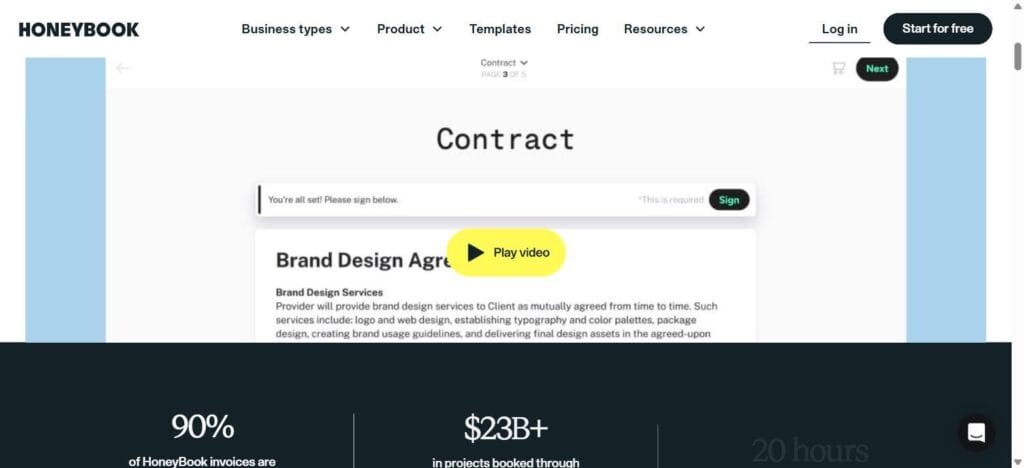
HoneyBook Smart File — contract step in a live proposal flow
HoneyBook’s flagship feature is “Smart Files” — interactive documents that combine service selection, contract signing, and payment into one flow. A prospect can review terms, sign an agreement, and submit payment from their phone in a few minutes, all inside a single linked document.
Team seats and workflow flexibility
HoneyBook provides a polished interface that requires minimal staff training. Its simplicity comes at the expense of deep custom workflow logic — it handles linear client onboarding and payment collection well, but lacks the multi-branch automation and external CRM data mapping found in a document specialist like PandaDoc.
Side-by-side comparison table
| Feature / Dimension | PandaDoc | Dubsado | HoneyBook |
| Primary category | Document specialist (CRM bolt-on) | All-in-one client management | All-in-one client management |
| Starting price (2026) | $19/seat/mo (Starter, annual)$49/seat/mo (Business, annual) | $35/mo (Starter)$55/mo (Premier) | $29/mo (Starter, annual)$49/mo (Essentials, annual) |
| Best fit for | Scaling sales teams with an existing CRM | Budget-conscious teams wanting flat-rate software | Small teams wanting a polished, fast-setup platform |
| CRM integration depth | Native and deep (HubSpot, Salesforce, Pipedrive) | Limited (Zapier/Make webhooks, Premier only) | Limited (Zapier/Make webhooks) |
| Standalone CRM capability | None — requires an external CRM | Built in (lightweight lead/deal tracking) | Built in (visual client pipeline) |
| Combined proposal + pay | Requires a CRM/automation flow | Native (proposal → contract → invoice) | Native (Smart Files: select → sign → pay) |
| Recipient analytics | Advanced (page-by-page tracking, view alerts) | Basic (opened/signed status) | Basic (opened/payment status) |
| Client portal | No — document links only | Yes | Yes |
| Setup learning curve | Low | High | Very low |
Which one fits your stack
Choosing the right tool comes down to your agency’s existing software architecture.
Scenario A: Your agency is already standardized on a dedicated CRM
If your agency already relies on a centralized CRM, as covered in our HubSpot vs. Pipedrive vs. Close comparison, PandaDoc fits more cleanly. Forcing Dubsado or HoneyBook into a stack that already has a dedicated CRM tends to create duplicate databases and fragmented deal stages. PandaDoc sits on top of your existing CRM instead of replacing part of it.
If your proposal volume is low or you’d rather not add a subscription yet, our free Google Drive proposal automation build covers a no-added-cost alternative.
Scenario B: Your agency wants a single tool to act as its CRM and operations hub
If you run a boutique agency without a dedicated CRM and want one platform to handle lead capture, proposals, contracts, and invoicing:
- Choose Dubsado if you want flat-rate pricing regardless of proposal volume, deep customization, and don’t mind a longer setup process.
- Choose HoneyBook if you prioritize fast setup, a polished client-facing experience, and per-tier pricing that scales with feature needs rather than user count.
The honest limitations
First, SaaS pricing models and feature tiers change frequently. Software vendors routinely adjust seat limits, gate features behind higher tiers, and alter discount structures — HoneyBook’s current rates, for example, reflect a substantial price increase from its previous tier structure. Per our 90-day SaaS audit framework, revisit this comparison’s numbers every three months rather than treating them as fixed.
Second, a proposal tool cannot fix a broken sales process. Moving from email attachments to PandaDoc, Dubsado, or HoneyBook speeds up document delivery and improves presentation, but it will not close unqualified leads on its own. The success of your proposal workflow still depends on clean CRM data, clear pricing boundaries, and consistent sales discipline.
