
The blog post that never became anything else
You spend six hours writing a 1,500-word article for your agency’s site. You publish it, post a link on LinkedIn with a caption reading “New blog post live!”, and move on to client work. Buried inside that single article sit five sharp insights, two concrete frameworks, and a counterintuitive takeaway. Yet they remain locked on your blog because reformatting long-form prose into individual social posts feels like a separate, exhausting project. Sitting on published long-form content while staring at a blank social media text box is an unnecessary operational waste.
Why one prompt shouldn’t produce one output
In our AI brief writing guide and our AI meeting notes guide, we established a core operational rule for language models: structured inputs generate structured outputs. Most agency owners who attempt content repurposing fail because they use a single, vague instruction: “Summarize this blog post for social media.”
That prompt inevitably fails. It produces a generic 100-word summary that is too long for X, too dry for LinkedIn, and structurally useless for a visual carousel.
To turn a blog post into a week of high-performing distribution, your prompt must treat each social platform as a distinct reading experience rather than the same text trimmed to different character counts. LinkedIn requires an insight-led narrative — a practitioner voice, an uncomfortable truth or counterintuitive lesson, and a conversational opening that encourages peer commentary. X demands extreme compression — a single, standalone observation stripped of preamble, corporate speak, or link drops. Carousels and threads require a sequential narrative arc, with information broken into a slide-by-slide progression: Hook, Trap, Mechanism, Rule, Payoff.
A single multi-format prompt can extract all three from your article in one run, provided you define the precise formatting rules, platform constraints, and voice guardrails for each output.
The prompt that works
Copy and save the prompt template below. It instructs the AI to analyze your source article and generate three fundamentally different social formats in a single pass.
[PROMPT STARTS]
You’re repurposing a long-form blog article into social content for a small-agency audience. Produce exactly three outputs, clearly labeled, each doing a different job, not three versions of the same paragraph.
1) LINKEDIN POST (180-250 words, professional, insight-led):
– Open with the counterintuitive insight from the article, not the tool name or title.
– Write like a practitioner sharing a lesson learned, not an ad for a workflow or a promotional blog post.
– Focus on one clear takeaway.
– Include the honest operational caveat or vulnerability from the article.
– End with one soft, open question inviting comments. No hard CTA, no link drops, no promotional filler.
2) X/TWITTER POST (under 280 characters):
– One single point only — the sharpest, most quotable observation in the article.
– No thread, no build-up, no hashtags, no links.
3) CAROUSEL/THREAD OUTLINE (5 sequential slides):
– Slide 1 — The Hook (Headline + 1-sentence support challenging common practice)
– Slide 2 — The Trap (Headline + 1-sentence support explaining why standard habits fail)
– Slide 3 — The Mechanism (Headline + 1-sentence support explaining the operational fix)
– Slide 4 — The Rule (Headline + 1-sentence support stating the non-negotiable boundary)
– Slide 5 — The Payoff (Headline + 1-sentence support detailing the final outcome)
VOICE AND STYLE RULES:
– Direct, authoritative, peer-to-peer tone.
– Avoid buzzwords, corporate jargon, and dramatic marketing teasers (“Game-changer”, “Revolutionize”, “Unlock”).
– Do not mention that this was generated from an article.
SOURCE ARTICLE:
[PROMPT ENDS]
The source article — what goes in
To test this prompt, we used our own published article on invoice follow-up automation. This long-form piece repurposes exceptionally well because it contains three structural elements every successful content transformation requires: a specific counterintuitive hook — agencies do not wait 45 days for payment because clients refuse to pay, they wait because agency owners delay sending uncomfortable reminder emails; a concrete operational mechanism — an automated daily scenario that monitors an invoice tracker and fires reminders at 3+ and 14+ days overdue; and an explicit operational boundary — automation handles routine lateness, but phone calls handle actual client disputes.
When your source material contains clear practitioner insights, the AI does not need to invent substance — it simply repackages existing authority into platform-native formats.
The output — three formats from one input
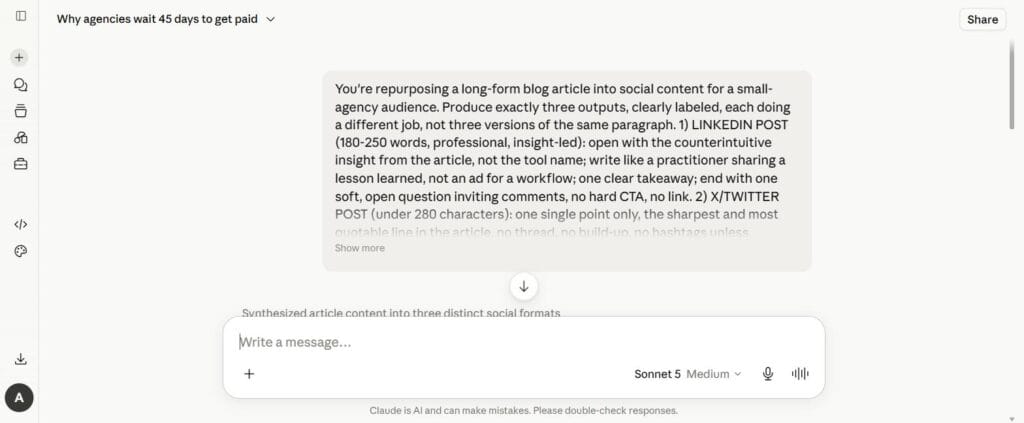
LinkedIn post
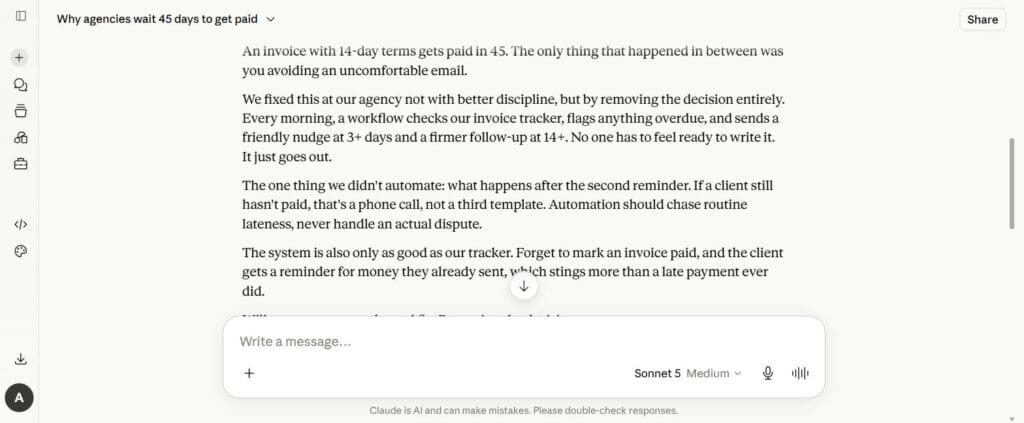
An invoice with 14-day terms gets paid in 45. The only thing that happened in between was you avoiding an uncomfortable email.
We fixed this at our agency not with better discipline, but by removing the decision entirely. Every morning, a workflow checks our invoice tracker, flags anything overdue, and sends a friendly nudge at 3+ days and a firmer follow-up at 14+. No one has to feel ready to write it. It just goes out.
The one thing we didn’t automate: what happens after the second reminder. If a client still hasn’t paid, that’s a phone call, not a third template. Automation should chase routine lateness, never handle an actual dispute.
The system is also only as good as our tracker. Forget to mark an invoice paid, and the client gets a reminder for money they already sent, which stings more than a late payment ever did.
How do you handle the gap between a routine late payment and an actual client conversation?
X/Twitter post
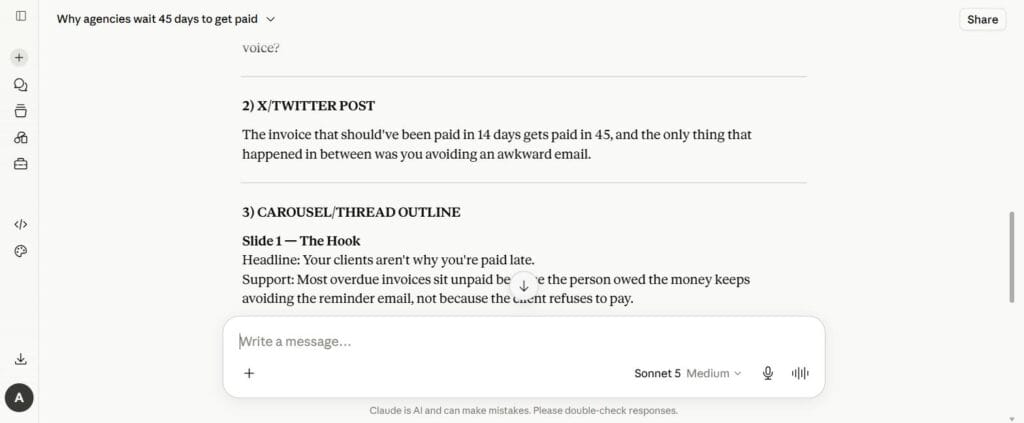
The invoice that should’ve been paid in 14 days gets paid in 45, and the only thing that happened in between was you avoiding an awkward email.
Carousel/thread outline
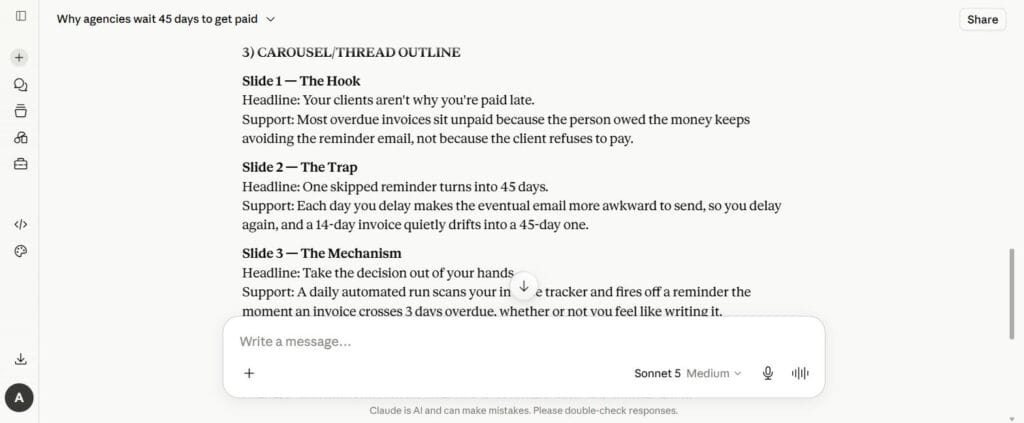
Slide 1 — The Hook
Headline: Your clients aren’t why you’re paid late.
Support: Most overdue invoices sit unpaid because the person owed the money keeps avoiding the reminder email, not because the client refuses to pay.
Slide 2 — The Trap
Headline: One skipped reminder turns into 45 days.
Support: Each day you delay makes the eventual email more awkward to send, so you delay again, and a 14-day invoice quietly drifts into a 45-day one.
Slide 3 — The Mechanism
Headline: Take the decision out of your hands.
Support: A daily automated run scans your invoice tracker and fires off a reminder the moment an invoice crosses 3 days overdue, whether or not you feel like writing it.
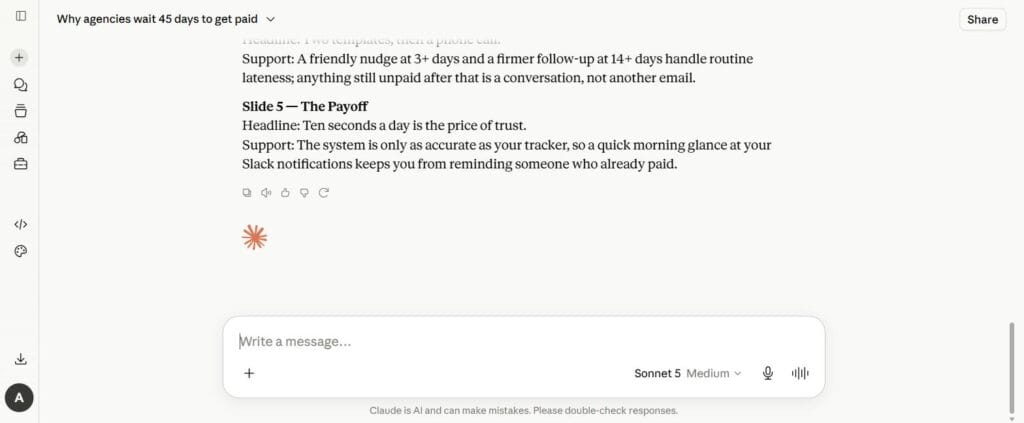
Slide 4 — The Rule
Headline: Two templates, then a phone call.
Support: A friendly nudge at 3+ days and a firmer follow-up at 14+ days handle routine lateness; anything still unpaid after that is a conversation, not another email.
Slide 5 — The Payoff
Headline: Ten seconds a day is the price of trust.
Support: The system is only as accurate as your tracker, so a quick morning glance at your Slack notifications keeps you from reminding someone who already paid.
Analysis of the AI output
The LinkedIn post sounds like an agency founder sharing a real operational lesson, not a summary. The X post extracted the single punchiest observation from the entire 1,500-word piece. The carousel outline maps cleanly onto a 5-slide visual PDF or an X thread — each slide does a distinct job in the argument, none of them repeat the others.
The model strictly obeyed the negative constraints. It avoided promotional links, omitted marketing hooks like “Here’s 5 ways to revolutionize your billing!”, and kept the honest operational vulnerability intact — the line about accidentally reminding a client who already paid stayed in, unsoftened.
Total edit time across all three social formats: zero minutes. All three were publish-ready as generated. That is not an average result to expect from generic prompts — it happened because the prompt built explicit negative constraints directly into the instructions: banning marketing jargon, prohibiting link drops, enforcing word counts, and requiring an operational caveat. A looser prompt — “repurpose this for social media” — will still need a voice pass before it sounds like a person rather than a summary. The zero-minute result is what happens when your constraints do that work up front.
Building this into your publishing habit
Run the prompt on publication day. Don’t wait two weeks until an article feels cold — the moment a new long-form piece goes live, paste the final text into the prompt and generate your social assets immediately.
Store the outputs somewhere you’ll actually find them again. Drop the three social outputs into your content tracker, following the storage guidelines from our workflow documentation guide.
Batch your scheduling instead of posting live each morning: the LinkedIn narrative on Monday, the punchy single-line post on X midweek, the five-slide carousel on Friday. One blog post now powers a full week of distribution.
What to add next
Productize content repurposing for clients: apply the same prompt structure to client blog posts. A “social distribution package” alongside a standard content retainer expands account revenue without adding headcount.
Connect a social scheduling queue: integrate a tool like Buffer, Typefully, or Publer so the generated outputs go straight into a queue instead of manual posting.
Build a swipe file: save your best-performing generated posts alongside the prompts that produced them. Over time this refines your negative constraints and voice directives into something sharper than the version in this article.
The honest limitations
AI social extraction requires high-quality source material. This prompt reformats and compresses existing insight — it does not invent original thinking. If the underlying blog post is derivative or surface-level, the resulting LinkedIn posts and carousels will distribute surface-level advice across three platforms instead of one. The quality ceiling of your social content is set by the depth of your original article, not by the prompt.
And the zero-minute edit time in this article is specific to a prompt built with explicit voice and negative constraints — it is not a guarantee for any repurposing prompt. A vaguer instruction will still need a human pass to catch overly formal phrasing or repetitive patterns. Read the output aloud before queueing it. If a sentence sounds like corporate marketing copy rather than a peer talking to a peer, fix the line manually before it goes out.
