The question that actually decides this
Asking which automation tool is best is the wrong starting point, because all three of these tools can build the workflows a small agency needs. The questions that actually decide it are: how technical are you, how many workflows will you eventually run, and how does each platform’s way of counting usage fit your volume? I have built real workflows in all three platforms — the same form-capture automation, side by side — and this comparison comes from those builds, not from feature pages. By the end you will know which of the three fits your situation, including the pricing catch on Zapier’s free plan that only shows itself after you press Publish.
The same workflow, built in all three
The fairest way to compare automation tools is to build a near-identical workflow in each one — a client form submission triggering an email, a team notification, and a data log — and pay attention to how each platform makes you think.
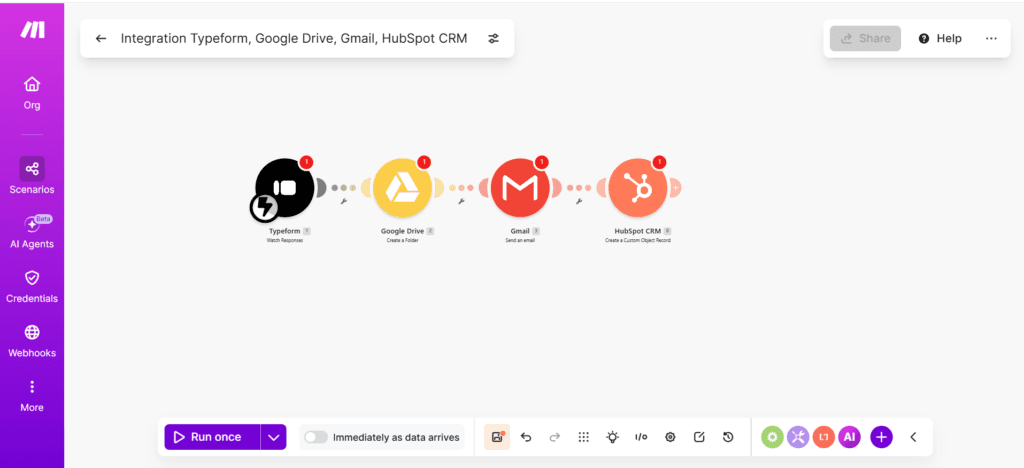
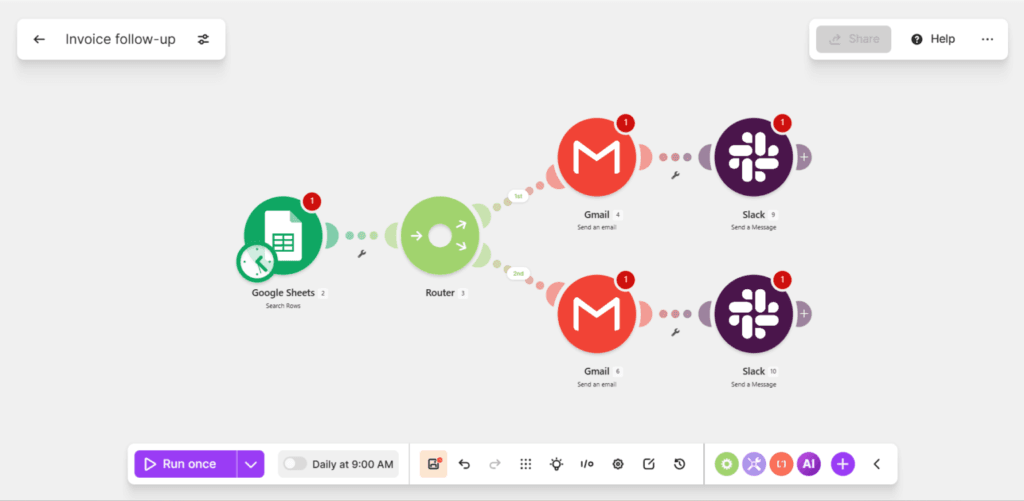
In Make, you work on a visual canvas. Modules are round icons connected left to right, and the whole workflow reads like a map. Building our client onboarding scenario meant clicking a plus, searching for each app, and watching the chain grow across the screen. Branching logic is a first-class citizen: the Router splits a scenario into parallel paths you can see.
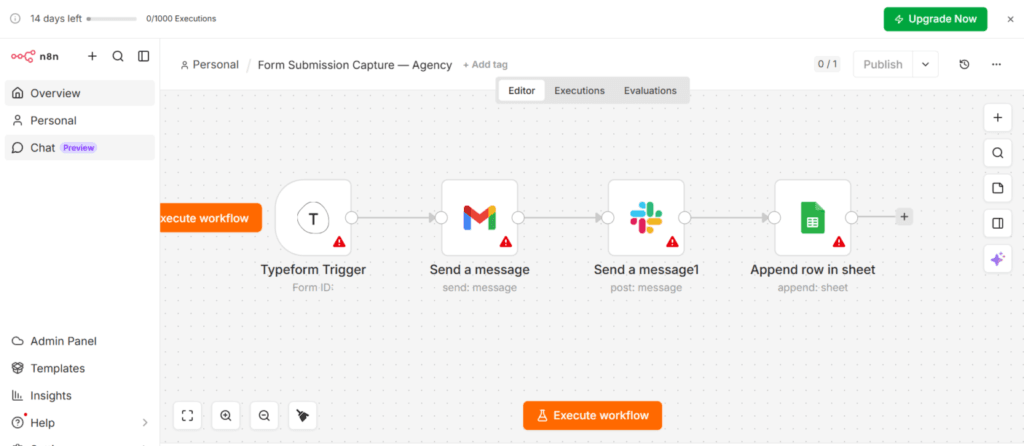
In n8n, you also get a canvas, but the feel is more technical — nodes instead of modules, a darker editor, and settings panels that assume you are comfortable seeing raw data. Our form submission workflow took four nodes in a straight line, and the platform never got in the way — but it also never held my hand.
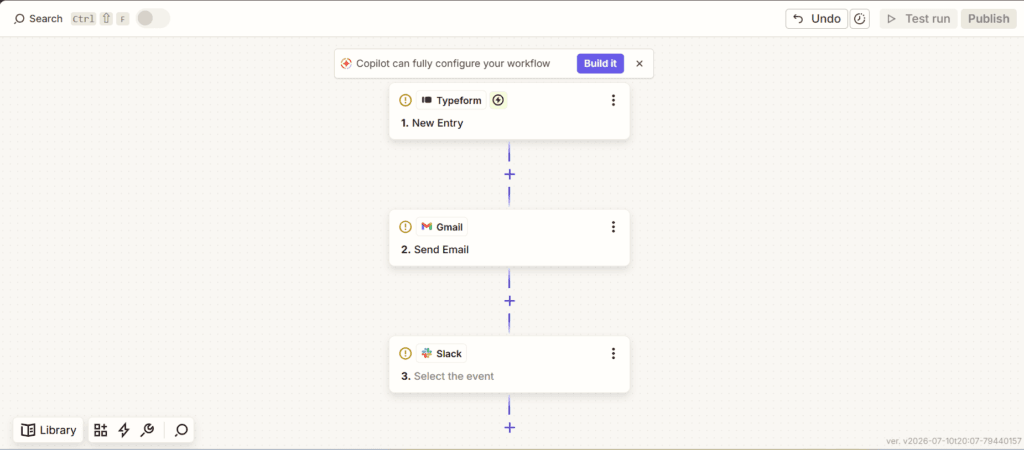
Zapier is different from both: it is not a canvas at all. A Zap is a numbered vertical list — trigger at the top, actions below, 1, 2, 3. There is no map to zoom around; you scroll. For a first-time builder this is genuinely the least intimidating of the three, because it looks like a checklist rather than a diagram. One difference that surprised me: Zapier refused to publish the Zap until every step had a live, connected account behind it. Make and n8n both let you save skeleton workflows full of warning triangles and come back later; Zapier’s editor insists on a finished, connected Zap before anything goes live.
Pricing — where the three philosophies show
All three publish simple-looking price lists, but the numbers only make sense once you understand that each platform counts usage in a different unit. All figures below were verified on the live pricing pages in July 2026.
| Tool | Free tier | First paid tier | What it counts |
| Zapier | $0 — 100 tasks/month; multi-step Zaps only via a 14-day trial | Professional, $19.99/month — unlocks multi-step Zaps | Tasks — every action step is one task; triggers are free |
| Make | $0 — 1,000 credits/month; routers and filters included | Core, $9/month — 10,000 credits | Credits (formerly called operations) — every module that executes is one credit |
| n8n | Cloud: 14-day trial only. Self-hosted Community Edition: free, unlimited | Starter, $20/month billed annually — 2,500 executions with unlimited steps | Executions — one full workflow run is one execution, however many steps it contains |
Here is what those units mean on a real morning. Take a form-capture workflow — the one I built in all three platforms — handling 5 client form submissions in a day. Zapier consumes exactly 10 tasks: the Typeform trigger is free, so only the action steps count — the Gmail send and the Slack post, twice per submission (5 submissions × 2 actions). Make counts every module that executes, trigger included: 3 modules per run × 5 submissions is 15 credits. n8n counts the whole run as one unit: 5 submissions is 5 executions, whether each run has three steps or thirty. At tiny volume the differences are pocket change. At real volume they become the entire decision — 5 submissions a day is 300 tasks a month on Zapier, triple the free allowance, while the same traffic uses under a tenth of n8n Starter’s execution quota. Our invoice follow-up workflow is another good stress test of this math on your own numbers.
Where each one wins
Zapier
Zapier has the largest app library of the three by a wide margin, the gentlest first-time experience, and documentation that answers almost any question before you finish typing it. If the app you need to connect is obscure, Zapier is the platform most likely to support it. For a genuinely simple two-step automation — form in, email out — the free plan does the job forever at no cost.
Make
Make’s visual canvas is the best thinking environment of the three: you can see an entire workflow, branches included, in one look. And its free tier is quietly the most capable — the pricing page itself lists routers and filters as free-plan features, which means real branching logic without paying anything. The two-branch invoice workflow below runs entirely on Make’s free tier; on Zapier’s free plan this workflow cannot exist at all.
n8n
n8n wins on economics at scale and on control. Because one execution covers an entire run with unlimited steps, a $20 Starter plan running 2,500 multi-step workflows a month is the strongest per-workflow value of the three. And the self-hosted Community Edition is genuinely free with no execution limits at all — for an agency with a technical person on hand, that is a real option the other two simply do not offer.
Where each one loses
Zapier
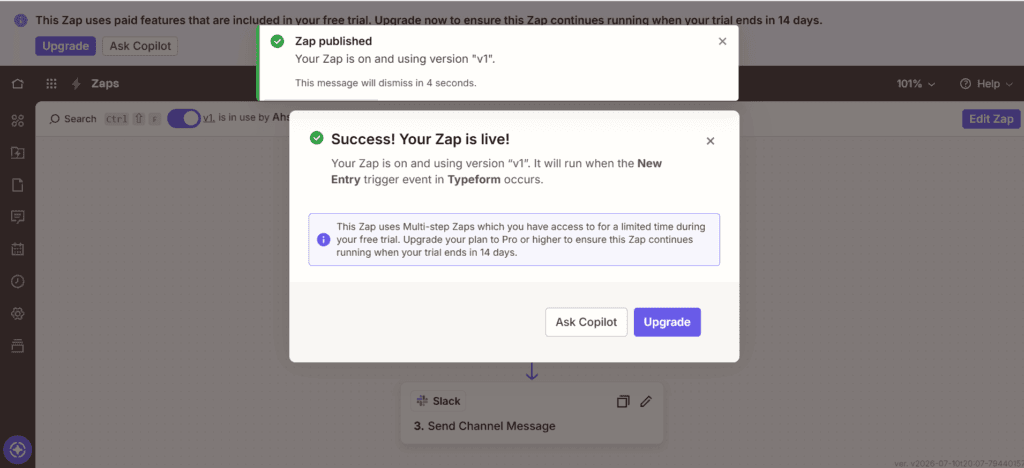
Zapier’s weakness is that its free plan is smaller than it feels. When I built a three-step Zap on a fresh free account, it built fine and published fine — and then a banner appeared: “This Zap uses Multi-step Zaps which you have access to for a limited time during your free trial. Upgrade your plan to Pro or higher to ensure this Zap continues running when your trial ends in 14 days.” In other words, multi-step Zaps are a Professional feature that new accounts borrow for two weeks. A new agency owner builds their workflow in week one, it runs beautifully, and on day 15 it needs $19.99 a month to keep running. Nothing about that is hidden exactly — but you only meet it after you have already built the thing. Features that work during the trial and stop after it are the fine print of Zapier’s free plan, and the 100-task monthly ceiling arrives fast at any real volume.
Make
Make’s credit math ambushes people. Because every executing module costs a credit, a scenario that feels small can quietly consume its allowance — a daily scheduled run burns credits even on mornings when there is nothing to process, something we flagged in the invoice workflow’s own limitations. Make also renamed operations to credits recently, so most tutorials on the internet, including some of ours, still say ops — same thing, new label. And the canvas that makes Make pleasant at five modules can turn into spaghetti at twenty-five.
n8n
n8n has the steepest learning curve of the three and the least forgiving free story in the cloud: there is no permanent free cloud tier at all, only a 14-day trial — it is the only platform here where $0-a-month-forever is not a cloud option. Self-hosting solves that, but self-hosting is real work: a server, updates, backups, and someone responsible when it breaks. To be clear, the self-hosted Community Edition is completely free and offers unlimited workflow executions on your own hardware. The $800 Business plan is a separate, paid self-hosted tier intended strictly for organizations requiring official technical support, advanced user permissions, and corporate compliance features on their infrastructure. Do not confuse the two — one costs nothing, the other costs more than every other option in this article combined.
The verdict, by situation
There is no single winner — there are four situations:
If this is your first automation ever and it is genuinely simple — one trigger, one action — start with Zapier’s free plan. It is the easiest on-ramp in the industry. But know the asterisk: the moment your workflow needs a third step, you are on borrowed trial time, and day 15 costs $19.99 a month. If you already know you will branch, skip the cliff and start with Make.
If you will run a few workflows, think visually, and want the most capable free tier, choose Make. Routers and filters on the free plan mean real logic at zero cost, and the $9 Core tier is the cheapest paid step of the three.
If you expect many workflows or high volume, n8n’s execution pricing is built for you — one run is one execution regardless of steps, and $20 a month covers 2,500 of them.
If you have technical comfort or a technical teammate, n8n self-hosted removes the meter entirely. Free forever, unlimited runs, on your hardware — paid for in your time instead of your card.
The honest limitations
This comparison reflects small-agency use — a handful of workflows, modest volume, no dedicated IT. At enterprise scale the calculus changes completely and none of these verdicts should travel there. All three platforms also ship changes constantly: Make renamed its billing unit within the last year, Zapier reshaped its plan structure, and n8n’s prices moved from euros to dollars between our own articles. Every figure here was verified on the live pricing pages in July 2026; treat that date as a freshness label, not a guarantee.
And the truth that outranks every feature comparison: the best automation tool is worth less than the tool you will actually stick with. Switching platforms later costs rebuilt workflows and relearned habits. So pick the one that fits your situation above — then build your first real workflow this week. Our Make.com client onboarding tutorial and our n8n form submission workflow are both step-by-step starting points, built and tested before they were published.
