
Why ‘just use AI’ doesn’t work for briefs
The most common way agency owners try AI for briefs is also the least effective: paste some notes into ChatGPT, type ‘write a client brief,’ and wait. The output is generic — a structure that could describe any project for any client, populated with language so broad it could have been written without ever speaking to the client. Most people conclude AI is not useful for this kind of work. The conclusion is wrong, but the experience is accurate. A vague prompt produces a generic output. The problem is not the AI — it is the absence of a structured prompt. Give the model a clear role, a defined output structure, and specific raw material, and the output changes completely. This article gives you the prompt that does that.
What a good brief actually contains
Before the prompt, the structure. Every client brief that functions well in a real agency context contains five things: the business objective — not the deliverable but the outcome the client wants the deliverable to produce; the target audience described specifically enough that a designer who has never spoken to the client could make a visual decision from it; the constraints — budget, timeline, approval process, and any technical non-negotiables; the success metric — how you and the client will know in six months whether this worked; and the tone or brand guardrails that govern what the output can and cannot look like. The prompt below asks for all five, which is why the output contains all five.
The prompt that works
This is the exact prompt tested against real discovery call notes to produce the output shown later in this article. Copy it, paste your own notes where indicated, and run it in Claude or ChatGPT.
[PROMPT STARTS]
You are an experienced account/project manager at a digital agency. Below are my raw, unedited notes from a client discovery call. They are messy, incomplete, and out of order on purpose — that’s how I actually take notes during a call.
Turn them into a clean, professional one-page client brief. Use these exact sections, in this order:
- 1. Client & Project Overview
- 2. Objectives
- 3. Target Audience
- 4. Budget & Timeline
- 5. Technical & Design Constraints
- 6. Stakeholders & Approval Process
- 7. Competitive Context
- 8. Next Steps
- 9. Open Questions / Needs Clarification
For section 9, flag any item in my notes that is ambiguous, unconfirmed, or where I used uncertain language. Explain briefly why each item needs clarification before the project starts.
Keep the entire brief to one page. Use professional but direct language — no filler phrases, no vague statements. If something in my notes is specific, keep it specific in the brief.
Here are my raw notes:
Acme Digital - discovery call 7/22
attendees: me, Sarah (mktg director), Raj (IT/dev lead)

- website redesign, current site ~6 yrs old, dated, NOT mobile friendly
- budget - said "40-50k range", Sarah hinted could stretch to 60k if we show strong case, but needs CFO sign-off
- timeline - want to launch before big trade show, Nov 15 (Q4). so ~16 wks from kickoff, tight
- audience - B2B only, manufacturing/industrial buyers, procurement mgrs + plant ops ppl, skews 45-60, need credibility/trust NOT flashy startup vibe
- current pain pts: product catalog hard to find, no search filters, contact forms broken (!!), mobile bounce rate high per analytics
- constraint - legacy inventory system needs to integrate w/ product catalog via API. Raj says API "functional but poorly documented" lol
- constraint - brand guidelines VERY strict. logo can't go below certain px size, must use specific blue #003865, no other primary colors w/o sign off
- stakeholders - Sarah = main contact, Raj = IT/dev, VP James has final visual approval, hasn't joined calls yet, will review mockups later
- competitors mentioned - GlobalTech Supply + IndustrialOne, want to feel "more premium" than both
- next steps - send proposal by end of next wk, they want 2-3 homepage concepts before full build starts
- other - migrated to new CMS last yr, not sure if WordPress or custom?? need to confirm w/ Raj. SEO is bad currently, want it addressed but not the primary goal
- Sarah wants a case studies section + maybe video testimonials
- ask again about international/multi-language - I think she said no but wasn't 100% clear
[PROMPT ENDS]
The raw notes — what goes in
Here are the actual discovery call notes used to test this prompt — unedited, exactly as typed during the call:
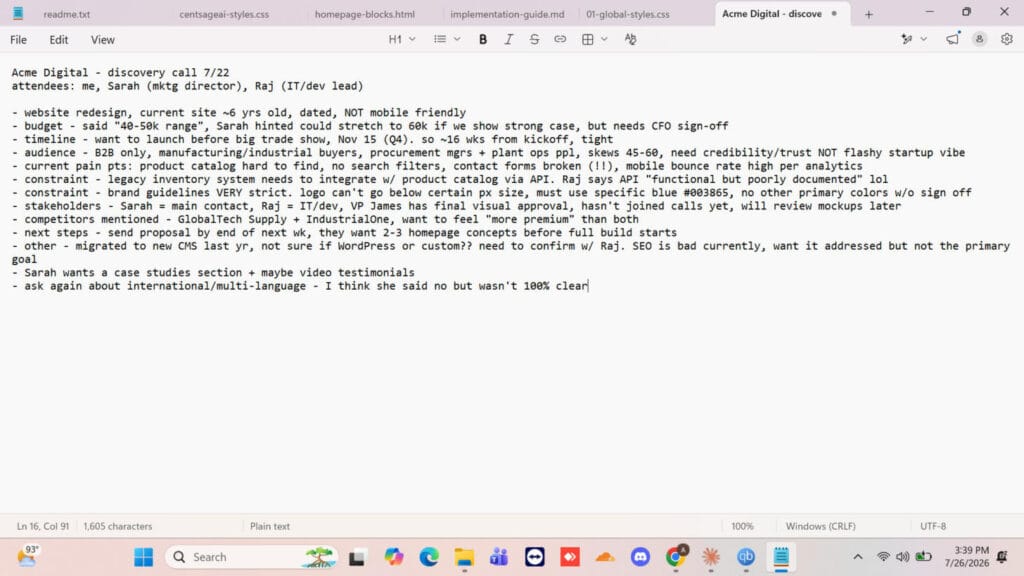
This is the level of input the prompt handles. No pre-cleaning required, no reorganizing before you paste. The model reads uncertainty in the notes — ‘I think she said no but wasn’t 100% clear’ — and treats it as data, not noise.
The output — what comes out
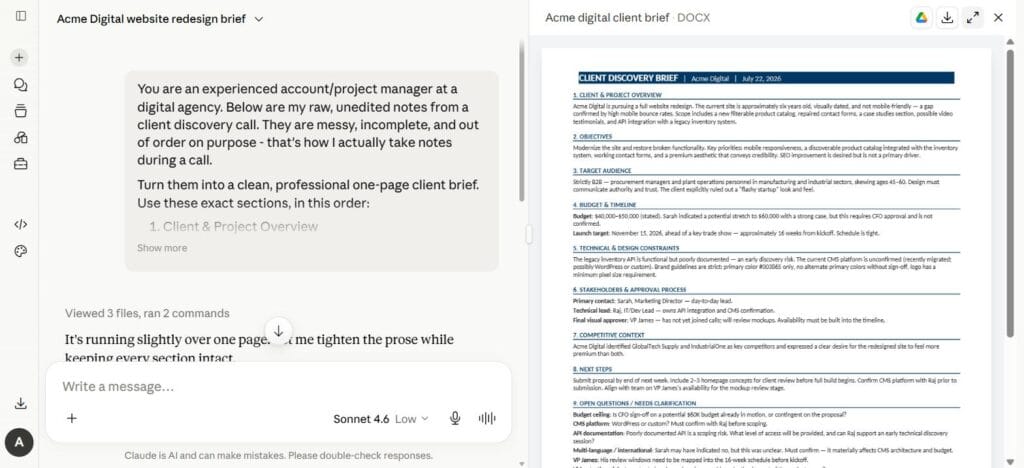
The output structured the raw notes into nine labelled sections, filled in specific details from the notes accurately (the CFO sign-off requirement, the exact hex code for the brand color, VP James’s role in visual approvals), and flagged five open questions in Section 9 that needed answers before the project could start.
The most useful of those five was the multi-language question: ‘Sarah may have indicated no, but this was unclear. Must confirm — it materially affects CMS architecture and budget.’ That sentence came from a note that said ‘I think she said no but wasn’t 100% clear.’ The model read the uncertainty, elevated it to a named risk, and explained why it matters. That is the kind of thing a senior account manager catches in review — and it appeared in the first draft without a follow-up prompt.
One other thing worth noting: Claude flagged that the output was running slightly over one page and offered to tighten the prose while keeping every section intact. That self-correction happened without a re-prompt — it is visible in the interface screenshot. The second version is what you see in the document panel.
► The edit took approximately 12 minutes — checking the budget ceiling note against what Sarah actually said, confirming the stakeholder approval chain matched the notes, and adjusting two sentences where the AI’s phrasing was more formal than our agency’s usual register. The brief was ready to send after that edit. A brief written from scratch typically takes 45 to 90 minutes for the same level of specificity.
Building this into your workflow
Run the prompt immediately after the discovery call, while your notes are fresh. The model handles incomplete notes well; it handles reconstructed notes written two days later less well because the reconstruction removes the uncertainty markers that make Section 9 useful.
Store the prompt template somewhere you can paste from in under 30 seconds — a pinned note, a Notion page, a Google Doc. ► Our workflow documentation guide covers how to keep templates like this findable and up to date. The prompt is the asset; treat it like one.
The one input that most reliably improves the output is the target audience description. The more specific your notes are about who the client’s customers are — their role, their decision-making behavior, what they distrust — the more specific the brief’s Target Audience section becomes. Everything else in the notes can be approximate. The audience description is worth one careful sentence during the call.
What to do when the output is wrong
When the output is generic despite a structured prompt, the cause is almost always one of three missing inputs. Check which one is thin in your notes and add one specific sentence before re-running:
- No specific business objective: ‘redesign the website’ is a deliverable, not an objective. ‘Increase trial signups from the product catalog page by 20% before the trade show’ gives the model something to orient every section around.
- Demographic-only audience description: ‘B2B manufacturing companies’ is a category, not an audience. ‘Procurement managers at mid-size industrial manufacturers who distrust flashy startup aesthetics and need to show ROI to a plant ops committee’ is an audience the model can write toward.
- Empty constraints section: budget range, hard deadline, and one technical constraint give the model the boundaries that make the brief usable. Without constraints, the output reads like a brief for a project with unlimited time and money — which no real project has.
Add the missing element, re-run the same prompt, and compare the outputs. The difference is usually significant enough to see immediately.
The honest limitations
AI brief outputs require a human edit before they go to a client — not a polish pass, a critical read. The model produces professional-sounding language, and professional-sounding language can make a weak underlying strategy sound more considered than it is. Read the brief as a client would: does the objective actually describe what the client said they wanted, or does it describe what a generic client usually wants? The edit is where your judgment enters.
The prompt is optimized for standard agency project types — website redesigns, campaign launches, retainers, brand projects. Highly technical briefs for enterprise software development, regulated industries, or complex multi-phase programs need more domain-specific structure than a general prompt provides. Use this as the starting point and extend the section list for your specific project types once you have run it a few times.
