
The follow-up email that never gets sent
It is 2:45 PM on Thursday, and your 30-minute status call with a key client just ended. You have two pages of typed bullet points containing half-baked ideas, interrupted thoughts, and vague agreements. You have another call starting in fifteen minutes.
You tell yourself you will clean up the notes and send a follow-up email before logging off. You don’t. By Monday, two key choices are half-forgotten, an action item sits unassigned, and three weeks later you waste 45 minutes re-litigating a scope decision everyone swore was settled. Missing or delayed meeting follow-ups cost agency profits, momentum, and client trust.
Why meeting notes need three categories, not one
In our AI brief writing guide, we demonstrated how AI transforms rough discovery notes into a single structured strategic document. Meeting notes, however, require a fundamentally different taxonomy. A brief describes one fixed project scope. A status meeting contains three distinctly different types of information that fail if lumped together into a generic summary:
- Decisions Made: binding choices agreed upon during the call. These belong in a permanent project record so they cannot be re-litigated later.
- Action Items: concrete tasks assigned to a specific individual with an explicit deadline, or flagged explicitly when no deadline was given.
- Open Questions: unresolved issues, technical dependencies, or budget questions that require follow-up but are not active tasks yet.
When you send a client a wall of narrative text, you force them to sift through prose to figure out what they owe you. By forcing your notes into these three distinct categories, you eliminate ambiguity, protect your scope, and accelerate project momentum.
The prompt that works
Copy and save the prompt template below. It processes raw meeting notes, enforces the three-category structure, formats decisions for instant entry into a decision log, compresses circular debates into single outcomes, and strips out non-project tangents.
[PROMPT STARTS]
You’re helping me turn raw call notes into an entry for our team’s Decision Log (Article 11 format). Read the rough notes below and sort everything into exactly three sections, formatted so I can paste it straight into the log.
Decisions Made
– What was agreed, and who agreed to it. One line per decision.
Action Items
– Task — Owner — Due date (write “no date given” if none was mentioned). One line per item.
Open Questions
– Anything unresolved that needs a follow-up, and who’s responsible for chasing it if that’s clear.
Rules:
– Skip small talk or tangents unless they produced a decision, action, or open question.
– If a topic circled before landing on an answer, record only the final answer, not the back-and-forth.
– Keep each line short enough to scan in a log — no paragraphs.
– If something is ambiguous, flag it in Open Questions rather than guessing.
Notes:
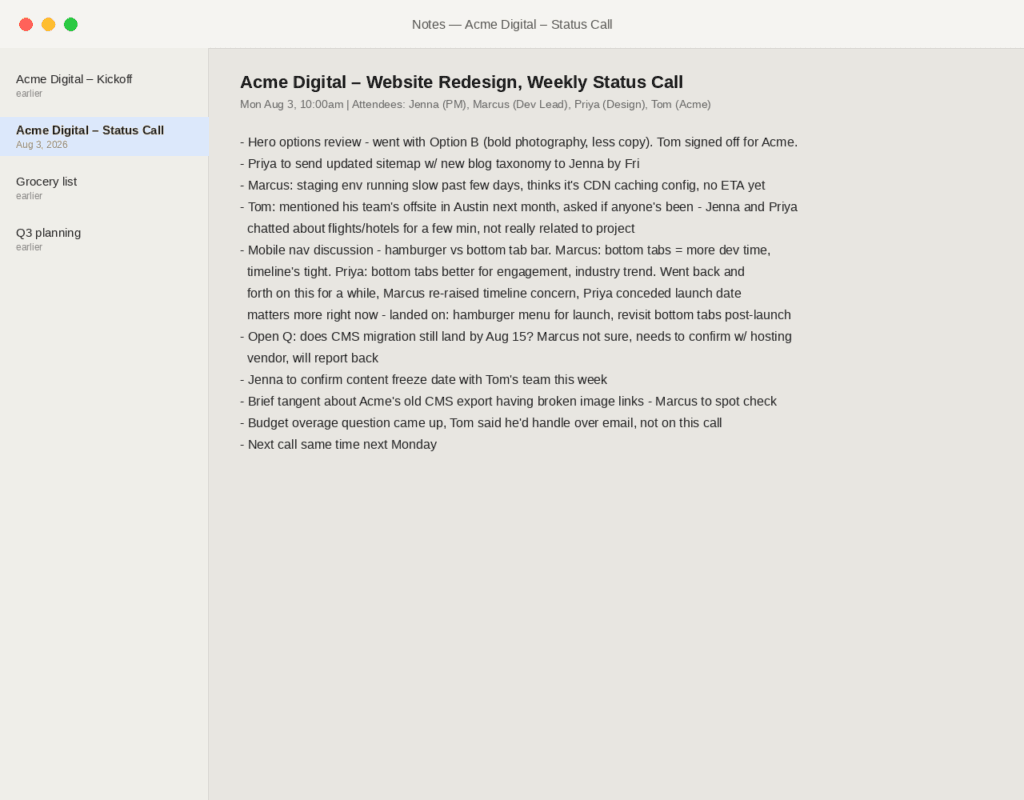
Acme Digital – Website Redesign, Weekly Status Call
Mon Aug 3, 10:00am | Attendees: Jenna (PM), Marcus (Dev Lead), Priya (Design), Tom (Acme)
Next call same time next Monday
Hero options review – went with Option B (bold photography, less copy). Tom signed off for Acme.
Priya to send updated sitemap w/ new blog taxonomy to Jenna by Fri
Marcus: staging env running slow past few days, thinks it’s CDN caching config, no ETA yet
Tom: mentioned his team’s offsite in Austin next month, asked if anyone’s been – Jenna and Priya
chatted about flights/hotels for a few min, not really related to project
Mobile nav discussion – hamburger vs bottom tab bar. Marcus: bottom tabs = more dev time,
timeline’s tight. Priya: bottom tabs better for engagement, industry trend. Went back and
forth on this for a while, Marcus re-raised timeline concern, Priya conceded launch date
matters more right now – landed on: hamburger menu for launch, revisit bottom tabs post-launch
Open Q: does CMS migration still land by Aug 15? Marcus not sure, needs to confirm w/ hosting
vendor, will report back
Jenna to confirm content freeze date with Tom’s team this week
Brief tangent about Acme’s old CMS export having broken image links – Marcus to spot check
Budget overage question came up, Tom said he’d handle over email, not on this call
[PROMPT ENDS]
The raw notes — what goes in
You do not need to clean up your notes while taking them on a live call. The prompt is designed to parse interruptions, fragmented thought patterns, informal shorthand, and side discussions. Here are the actual unedited notes from a weekly status call with Acme Digital:
The output — what comes out
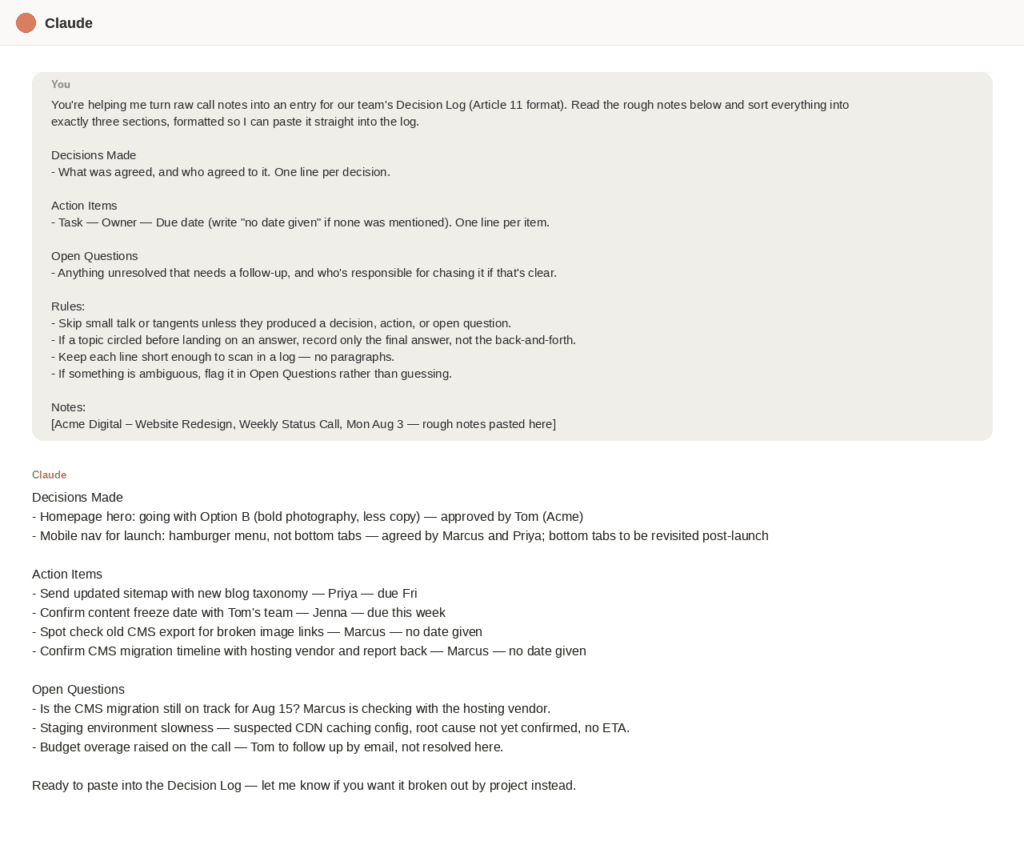
Circular discussion compression: Marcus and Priya debated mobile navigation for several minutes, weighing bottom-tab engagement trends against dev timelines and launch risk. A naive prompt summarizes the whole debate. The rule to record only the final answer compressed it into one scannable line: ‘Mobile nav for launch: hamburger menu, not bottom tabs — agreed by Marcus and Priya; bottom tabs to be revisited post-launch.’
Tangent exclusion: Tom’s team offsite in Austin, hotel tips, and flight chatter were completely omitted from the output. The rule to skip small talk unless it produced a decision, action, or open question kept the summary strictly focused on the project.
Honest open-question handling: when the notes described an unresolved technical issue — the CDN caching slowdown with no ETA — and a deferred budget conversation, the AI did not invent a resolution or a fake deadline. Both were correctly categorized as open questions requiring follow-up, exactly as they stood in the raw notes.
The honest edit time: running the prompt took 5 seconds. Scanning the output, confirming Marcus and Priya were assigned the correct action items, and dropping the lines into the project log took 2 minutes and 15 seconds.
From AI output to decision log in two minutes
The real leverage in this workflow comes from tying post-call notes directly into your agency’s governance system. Our client communication guide established the case for a central Decision Log to track binding choices and eliminate scope creep. Because the prompt explicitly mandates that same format, the Decisions Made section drops directly into the master tracking table without reformatting:
| Date | Decision | Agreed By | Reference Link |
| Aug 3, 2026 | Homepage hero: Option B (bold photography, less copy) | Tom (Acme) | [Insert Link] |
| Aug 3, 2026 | Mobile nav for launch: hamburger menu (revisit bottom tabs post-launch) | Marcus & Priya | [Insert Link] |
The two-minute post-call loop: run the raw notes through the prompt in Claude or ChatGPT; copy the three-part output into a follow-up email or Slack message to the client; paste the Decisions Made lines straight into your master Decision Log. Doing this immediately after every status call builds an audit trail that protects the team from forgotten agreements and unbilled scope creep.
What to add next
- Process notes immediately as a standing habit: run this prompt within 10 minutes of ending every call while context is fresh, rather than letting notes sit until Friday.
- Connect an automated AI transcription tool: pair an assistant such as Otter.ai, Fireflies, or Fathom with your calendar, and paste the raw transcript directly into this prompt to bypass live typing altogether.
- Store your prompt template in your agency wiki: keep this prompt accessible in your team’s workflow documentation, following the structure from our workflow documentation guide, so every project manager uses the same standard.
- Use the structure for internal team syncs: apply the same three-category system to internal huddles and engineering reviews to keep internal work aligned
Building an agency operations handbook
The honest limitations
AI categorizes what you write down, not what actually happened. If your live notes miss a critical decision or fail to mention a deadline, the AI output will reflect those exact gaps. The prompt automates structure, compression, and formatting, but it relies entirely on the fidelity of your initial note taking.
Action items and deadlines also require a quick human check before delivery. Language models extract named owners and deadlines reliably, but assigning a task to the wrong person or misstating a client commitment creates friction that far outweighs the time saved. Spend 30 seconds scanning the output before sending it to a client.
