The form submission problem agencies ignore until it costs them a client
It is a gap you won’t notice until a client follows up asking why you haven’t started on their project yet. When you run a solo agency with four to six accounts, relying entirely on standard email notifications from Typeform to Gmail can lead to silent failures. If a single alert drops into a spam filter, you have no backup log. Your client’s onboarding data remains stuck inside your form software, leaving you completely unaware that a new project is waiting for a response. By the time you realise what happened, the client has already followed up twice — and your window to make a strong first impression is gone.
What this workflow does in four steps
One incoming web request and zero manual steps — here is exactly what happens when a client submits your form:
- A client submits a Typeform intake form →
- n8n instantly sends a welcome email to the client via Gmail →
- n8n posts an alert to your internal Slack channel →
- n8n appends the full submission data to a Google Sheet as a permanent backup record
What you need before you build
Setting up this backup system requires standard accounts on each platform. You do not need any coding knowledge to link these tools together.
| Tool | Role in workflow | Free plan available? |
| Typeform | Captures client intake answers. | Yes — 10 responses per month as of July 2026. |
| n8n | The automation workspace that connects all four tools. | Yes — Cloud trial includes 1,000 free executions. The self-hosted version is entirely free with no execution limits (verified July 2026). |
| Gmail | Sends immediate confirmation messages to clients. | Yes — Standard Google accounts include this feature. |
| Slack | Dispatches real-time alerts to your team. | Yes — Free workspace tiers support instant notifications. |
| Google Sheets | Stores all incoming data in a centralized table. | Yes — Included free with personal Google accounts. |
Building the workflow in n8n — step by step
Open your n8n workspace dashboard and click the New button in the upper right quadrant to create a completely clean workspace canvas. Click the temporary project title at the top, change it to Form Submission Capture — Agency, and hit save.
Step 1 — Set up the Typeform trigger
Click the circle icon to add your first node. Search for Typeform and select the Typeform Trigger node. Click the credential dropdown and follow the OAuth login flow to connect your Typeform account. Once authorized, click the form dropdown menu, select your active client intake form, and save the node.
Step 2 — Send the client acknowledgement email
Click the small plus icon on the right edge of your Typeform node. Search for Gmail and select the Send a message action. Connect your Google account using the standard access prompts. Click inside the To field, open the dynamic data panel on the left, and map the client’s email from the form data. Write a clear subject line and input your text response into the message body.
Step 3 — Alert your team on Slack
Click the plus icon on your Gmail node to append the next action. Search for Slack and select the Send a Message action. Connect your team workspace. n8n will label this node as Send a message1 on your canvas workspace because you already have a Gmail node with a matching base action name, but the underlying setup steps remain identical. Choose your operations channel from the dropdown list and type your text template, inserting dynamic client details directly into the message body.
Step 4 — Log the submission to Google Sheets
Click the final plus icon on your Slack node. Search for Google Sheets and choose the Append row in sheet action. Link your Google Drive account. Select your master client spreadsheet and the specific tab title from the dropdown listings. Map each header column name to its corresponding dynamic value from your Typeform node so every client entry logs in the correct column automatically.
What this looks like when it runs
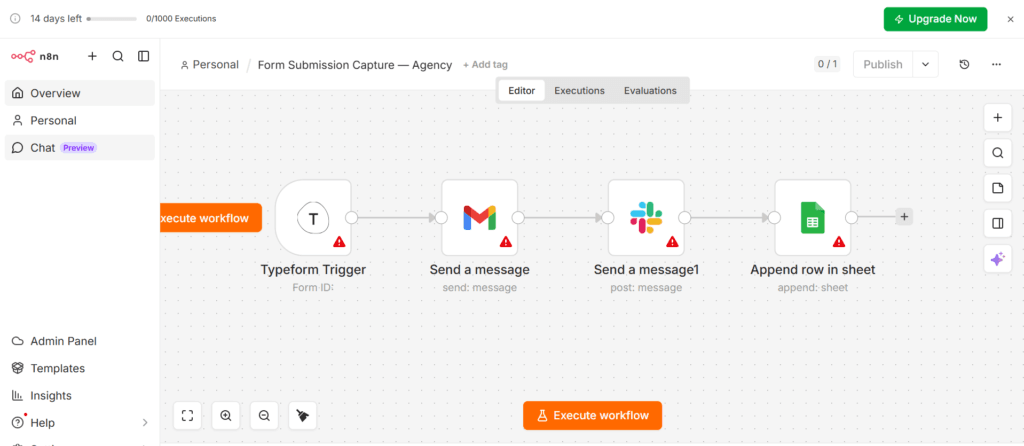
As you can see in the active n8n canvas layout above, the workflow runs in a direct horizontal line. The moment a client fills out your form, the workflow starts immediately without manual intervention, removing the risk of missed entries.
Here is the exact data layout you will see across your workspace:
- The Slack Notification: Your internal channel receives an automated line reading: New Client Alert: [Name] from [Company] has submitted onboarding. Scope: [Scope Selection].
- The Google Sheet Row: A fresh row is added to your file, filling out columns for Submission Date, Client Name, Email, and Project Details automatically.
- The Client Email: The prospect receives an instant message from your address reading: Hi [Name], thank you for reaching out. We have received your project details and will review them within 24 hours.
The difference between n8n and Make.com for this workflow
Both platforms can connect your web forms to your daily work tools, but they calculate usage costs differently. n8n counts a multi-step workflow run as a single execution, regardless of how many steps are connected inside the sequence. Make.com counts each individual module step separately every time a data path runs. Because of this structure, running automations with multiple steps through n8n can be more cost-effective as your monthly data submission volume grows. If you want to see how this looks on a different canvas, you can compare this setup to our Make.com client onboarding walkthrough.
Our Make.com client onboarding walkthrough’ to your Article 01 URL
What to add next
- Centralized Project Board Logging: Link a Notion database node to your workflow to track incoming client requests in your existing project board.
- High-Priority Budget Sorting: Add an internal conditional logic branch to scan incoming forms; if a project budget passes a specific threshold, n8n can route that warning to a dedicated high-priority channel.
- Automated Delay Follow-Ups: Place a dedicated wait node after your first email action to let n8n pause the execution path and send an automated follow-up check-in via Gmail if no update occurs within 48 hours.
The honest limitations
An automated form tracking workflow prevents data loss across your communication channels, but it cannot evaluate the quality or context of an incoming message. This setup processes text exactly as typed; it cannot flag empty answers, distinguish serious clients from automated web spam, or prioritize urgent notes that require immediate human evaluation. If an incoming user inputs inaccurate data, the workflow will pass those errors down the line to your spreadsheet rows and notification channels.
Additionally, your automation depends entirely on live webhooks to pass data from your form software. If Typeform experiences an internal server issue, n8n will not receive the initial trigger, and the entire sequence will stop. If you choose to host your automation on n8n Cloud instead of your own hardware, the Starter tier sits at €24/month when billed monthly (or €20/month if you choose annual billing, verified July 2026) and includes a cap of 2,500 executions. If the cloud cost is not viable, the self-hosted version of n8n runs on your own hardware with no execution limits and no monthly fee — the setup takes roughly 30 minutes following n8n’s official documentation. You will need to monitor this monthly limit if you add more workflows over time, as n8n Cloud pauses your active scenarios immediately if you exceed your execution allowance before the billing cycle resets.
