
The inbox is where client context goes to die
Gmail is not the problem — the pattern is. When every client conversation runs through one person’s inbox, three things break structurally. It is private: your teammates can see none of it, so covering for you means starting blind. It is unstructured: approvals, invoices, project questions and small talk interleave in one stream with no separation. And it is unsearchable at the moment of need: finding the decision a client agreed to six weeks ago means scrolling through four threads with similar subject lines, hoping. None of this is fixed by a better email habit. It is fixed by moving the system off the inbox entirely — using tools you already pay for.
The system in one view
Three layers, no new software. Channels for conversation: one Slack channel per client, so every discussion has one home. A log for decisions: a plain sheet where every agreement gets written down the day it happens. Automation for capture: the workflows already running your forms, reminders and reports post into the system on their own, so nothing depends on someone remembering to forward an email.
Layer 1 — One channel per client
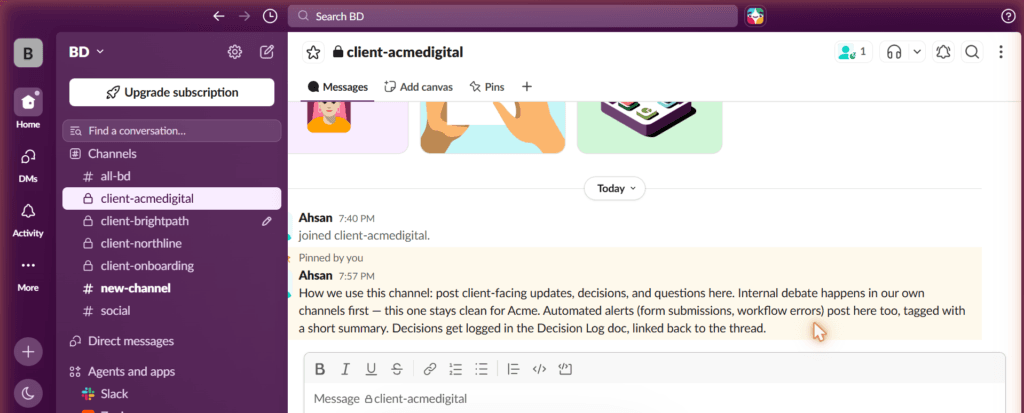
Create one Slack channel per client and name them with a consistent prefix: client-acmedigital, client-northline, client-brightpath. The prefix groups them in the sidebar and makes them findable by typing client- into search. Everything about that client’s work goes in their channel: updates, questions, files, automated alerts. What does not go in: internal debate. We keep a rule that internal discussion happens in our own channels first, and the client channel stays clean — so that if the client ever joins it later through Slack Connect, there is nothing in the history we would regret.
One decision to make deliberately: private or public channels. We made ours private — the lock icon in the screenshot below — which means client matters are visible only to the team members assigned to that client. The tradeoff is real: public channels let anyone in your workspace search past decisions, which is valuable in a bigger team. Private keeps client confidentiality tight in a small one. Neither is wrong; choose on purpose rather than by default.
Then pin a short usage note in every channel. Here is the exact note pinned in our own client channel — copy it word for word if you like:
“How we use this channel: post client-facing updates, decisions, and questions here. Internal debate happens in our own channels first — this one stays clean for Acme. Automated alerts (form submissions, workflow errors) post here too, tagged with a short summary. Decisions get logged in the Decision Log doc, linked back to the thread.”
Layer 2 — The decision log
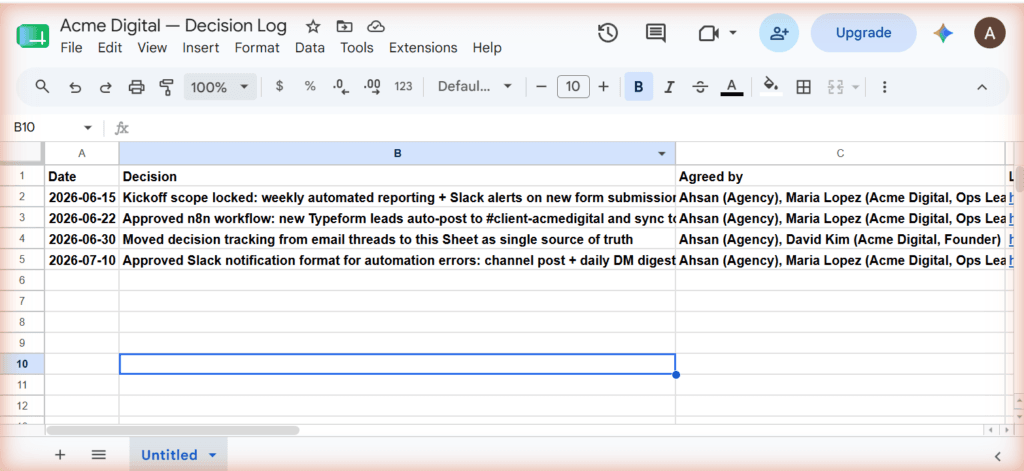
Every client gets a decision log: a plain Google Sheet with four columns — Date, Decision, Agreed by, Link. When something gets decided — scope locked, workflow approved, format changed — it gets one row, written the same day it was decided. That is the one rule, and same-day is the rule: a log filled in weekly is just tidier archaeology, while a log filled in same-day is the memory your team can actually search. The Link column points back to the Slack thread or document where the agreement happened, so the log is an index, not a transcript.
A dumb sheet beats a clever tool here on purpose. No workflow software, no statuses, no notifications to configure — nothing that can decay into unused features. Four columns and a habit. When a client asks in September what was agreed in June, the answer takes eleven seconds and includes the date, the names, and the link.
Layer 3 — Automation at the edges
The third layer is already built if you have followed our tutorials. Client form submissions post into the client channel automatically through the n8n form submission workflow — no one forwards anything, the intake announces itself. Invoice reminders notify the channel through the invoice follow-up workflow, so the team knows which client was nudged without asking. Weekly numbers assemble themselves through the automated client reporting workflow and land ready to review. The automation is what makes the system survive busy weeks: the channels fill themselves with the routine traffic, and humans only add what machines cannot — judgment and decisions.
What this looks like when a teammate covers for you
The payoff scene. You are away for a week; a teammate takes Acme. In the inbox world, they have nothing — your mail is yours, and the handover is a frantic forwarding session before your flight. In this system, they open #client-acmedigital, read the pinned note to learn the conventions, scan the decision log to learn the history, and scroll the recent channel messages to learn the present. Ten minutes and they know what you know — not because you briefed them, but because the system was never inside your head or your inbox to begin with.
Rolling it out without annoying anyone
Do not announce a revolution. Pick one client, set up their channel and log, run the system for two weeks, and let the results argue for expansion. Your clients will keep emailing — that is fine and it never fully stops. The system is internal: when a meaningful email arrives, paste the key content into the channel or log the decision it contains, and reply from wherever you like. You are not forcing clients to change; you are changing where the record lives. If you have not looked at what tools your team already pays for, your stack audit is worth running first — this system deliberately uses only what is already there.
The honest limitations
Conventions decay without an owner. The decision log only works if someone is responsible for it — same-day logging is a habit, and habits need a named human, not a team-wide hope. Review the log in your Friday routine and the habit holds; assume it maintains itself and in a month it is a sheet with four old rows.
Slack Connect — inviting the client into their channel — requires the client’s organisation to be on Slack and willing, which many are not. The system works fully without it; Connect is an upgrade, not a dependency. And some clients will simply never leave email, ever. The system absorbs them rather than fighting them: their record still lives in your channels and log, even if their words arrive by mail. The goal was never to change your clients — it was to make sure your agency’s memory stops living in one inbox.
