
The workflow that runs fine until you’re not there
You’re on holiday. A client submits an intake form. The n8n workflow fires correctly — the Slack alert posts, the email goes out, the Sheet row is logged. Then on day three, a teammate opens the Sheet to check for anything urgent and doesn’t recognize what they’re looking at. Nobody told them what the Status column means or that Unpaid rows need checking by Thursday. The automation ran correctly. The human layer failed because the process only existed in your head.
Automation handles the machine steps. Documentation handles the human ones. Neither works reliably without the other, and this article is about building the half most agencies skip.
What a workflow document actually is
Not a 40-page operations manual. A single-page record that answers four questions: what triggers this process, what does each tool do, who is responsible for the human steps, and what does failure look like. Short enough to be read in two minutes, specific enough to be followed without asking anyone. The format matters less than the consistency — every workflow document in your agency should have the same seven fields so anyone can find what they need without figuring out a new structure each time.
The seven-field template
Here are the seven fields and what belongs in each. The completed example below uses a different tool stack than our invoice follow-up workflow — which is deliberate. The seven-field template works regardless of which tools your agency runs.
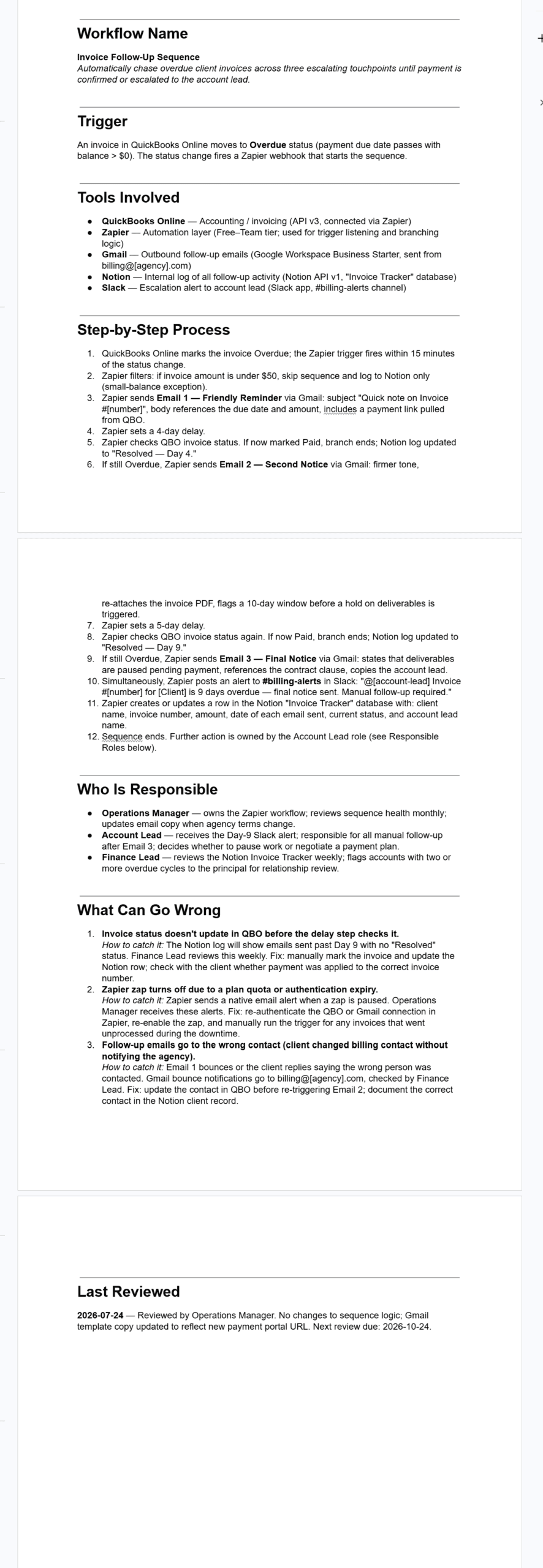
Workflow name and description: one line that explains what the workflow does and why it exists. Anyone who reads it should know immediately whether this is the document they need.
Trigger: what starts this workflow. Be specific — not ‘when a client pays’ but ‘when the Status column in the Invoice Tracker Sheet is changed from Unpaid to Paid by a team member.’ The trigger is where most human errors happen, so the more precise, the better.
Tools involved: list every tool with its tier or version noted. A workflow that breaks after a pricing change is often a workflow that was documented without noting which plan tier the feature requires. Include the tier — Zapier Professional, Make.com free tier, n8n Starter — not just the tool name.
Step-by-step process: numbered, one action per step, with the responsible party noted on any step that requires a human. Automated steps are labelled as such. The reader should be able to follow this without opening another document.
Who is responsible: named by role, not by person. ‘Finance Lead’ survives a team change; ‘Maria’ does not. Include what the role is responsible for and when — not just who they are.
What can go wrong: two to three specific failure modes with how to catch each one and what to do when it happens. This is the field that makes the document genuinely useful in a crisis rather than decorative. The failure modes you document are the ones you have already seen.
Last reviewed date: the single field that determines whether the document can be trusted. A completed workflow doc from eighteen months ago describes a tool that may have been renamed, a price that may have changed, a module that may have moved. The review date tells you whether to trust what you are reading. More on this below.
Start with the workflows that already exist
Don’t document everything at once. Document the three workflows most likely to break when you are unavailable. For most agencies those are:
- Invoice follow-up — if the reminders stop, clients go unpaid and nobody notices for weeks. Start here if you have built our invoice follow-up workflow.
- Proposal sending — a missed proposal after a strong sales call is the most expensive failure mode in the business. Document this if you have built our proposal automation.
- Client onboarding — the first week a client experiences sets the tone for the relationship. If onboarding depends on one person being available, that is a risk worth documenting immediately. Our stack audit covers the tools most agencies use here.
One doc per workflow, one afternoon. Then stop. Three documented workflows that the team actually reads is worth more than fifteen that nobody opens.
The review date is the only field that matters
Everything else in the document can be wrong and someone will catch it when they follow the steps. A missing review date is invisible — you cannot tell whether the document reflects how the workflow runs today or how it ran two years ago. That ambiguity is worse than no documentation at all, because a team member following an outdated doc confidently will cause more damage than one who knows they are operating without instructions.
Make this a standing rule: any workflow document more than 90 days old without a confirmed review date is treated as untrusted until someone checks it against the live workflow. Set a quarterly calendar reminder. The review itself takes ten minutes — open the doc, run through the steps against the current tool setup, update anything that has changed, and change the date. The review date is proof that the document is maintained, not just created.
Where the docs live
The same place your team already works. If you use Notion, create a Workflows section in your agency wiki and link it from the sidebar. If you use Google Drive, create a folder named _Workflows at the root level — the underscore sorts it to the top. The format matters less than the location rule: every workflow document must be findable in under 30 seconds by someone who has never opened it before. If they have to ask where it is, the documentation has already failed.
The workflow document captures repeatable processes. Your decision log — from our client communication guide — captures one-off agreements and approvals. The two complement each other: the log tells you what was decided, the doc tells you how to execute the decision. Keep them in the same place if you can.
What to document next
After the three core workflows, use this list to find what to document next:
- Anything that broke in the last 90 days — a broken workflow reveals a gap in either the automation or the documentation, and both are worth capturing.
- Anything a new team member asked about in their first week — questions are documentation requests in disguise.
- Anything that currently exists only in your head — if you are the only person who knows how something works, the business has a single point of vulnerability that one holiday exposes.
Building an agency operations handbook
The honest limitations
Documentation decays. A maintained short document beats an abandoned comprehensive one every time, which is why the seven-field template is deliberately minimal and the 90-day review rule is the only ongoing maintenance required. If the review habit does not stick, the docs will drift out of date and the team will stop trusting them — at which point they are worse than nothing because they give the illusion of a system without the substance of one.
And documentation does not fix broken automation. If an underlying workflow has a design flaw — a filter that fires on the wrong condition, a merge field that fails silently — writing it down clearly makes the flaw more visible, not less. This is actually useful: the act of documenting a process often reveals the problem that daily use had hidden. More than once, the documentation exercise is what exposes the thing that needed fixing.
