Why overlap happens to careful people
Nobody signs up for two tools that do the same job on purpose. Overlap happens slowly: one tool arrives for a specific client project, another comes in when a new hire brings their old workflow with them, and a third gets added because the team needed one feature the existing tools were missing at the time. Each decision was reasonable when it was made. The overlap only becomes visible when someone finally looks at the pairs side by side — which is exactly what this article does with six of the most common ones. Every price below was checked on the vendor’s live pricing page in July 2026.
Pair 1 — Loom + Zoom
What each tool costs
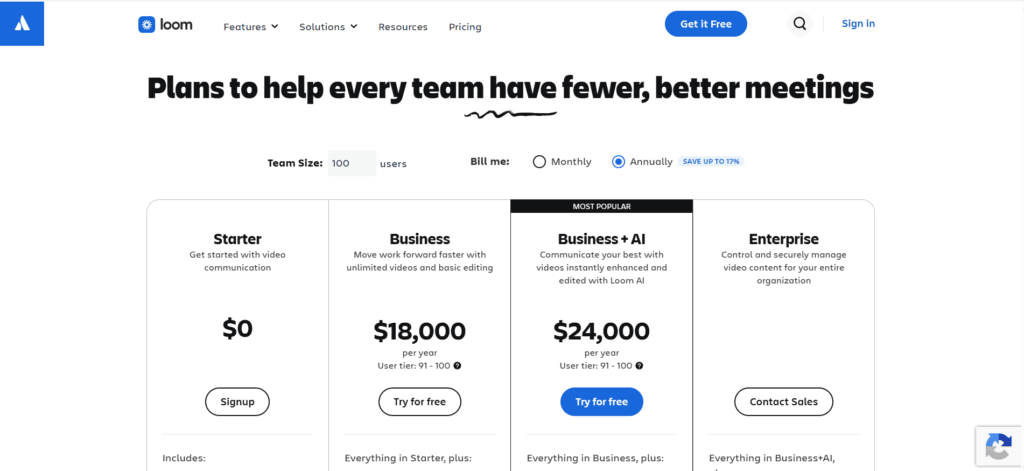
Loom Business runs $15 per user per month billed annually ($20 monthly). Zoom Workspace Pro is $15.99 per user per month (verified July 2026). A 10-person agency paying for both spends roughly $310 a month on video tools.
One thing worth knowing before you check Loom’s pricing page yourself: since Atlassian took over billing, Loom charges by user tier for the whole workspace on annual plans. Set the calculator to your real team size and look at the annual figure — for 10 users, Business works out to $1,800 a year, and every seat counts whether that person records videos or only watches them. Teams that used to add free viewer accounts have seen their bills multiply after the migration. Check what your workspace actually contains before you renew.
Where they overlap
Both record your screen and camera and produce a shareable link. Zoom Pro includes cloud recording on every seat, and if your team uses Slack on a paid plan, Slack clips cover the quick async video message use case as well. For a team that already pays for Zoom and Slack, Loom’s core function exists twice elsewhere in the stack.
Where they don’t
Loom’s viewing experience is genuinely better — the share page, comments, view tracking, and AI summaries are more polished than a Zoom cloud recording link. If your team sends recorded walkthroughs to clients as a core part of delivery, that polish is a real difference, not a cosmetic one.
The verdict
If Loom is used internally — quick explanations between teammates — Zoom recording and Slack clips already cover you, and you can cut the full per-seat spend. If recorded video is part of what clients see from you, keep Loom but audit the seat count hard: since the Atlassian integration, viewers count toward paid seats, so pay only for people who actually record.
Pair 2 — Dropbox + Google Workspace
What each tool costs
Dropbox Business Standard is $18 per user per month with a three-seat minimum. Google Workspace Business Standard is $14.40 per user per month (verified July 2026).
Where they overlap
Both are cloud file storage. Google Workspace Business Standard includes 2 TB of pooled storage per seat — a 10-person team gets a shared 20 TB pool inside the same product that already runs their email, docs, and calendar. That is more storage than most agencies will ever fill, sitting inside a subscription they already pay for.
Where they don’t
Dropbox still syncs large files faster in some setups, and its external sharing controls are more granular. Agencies that move very large video or design files daily, or that have clients who insist on Dropbox links, may have a real dependency rather than an overlap.
The verdict
If Dropbox is holding general files — documents, assets, archives — Google Workspace already covers you and the separate bill can go. If your daily work involves moving multi-gigabyte files under deadline, test one real week of that work through Drive before cancelling anything. If Drive holds up, cut; if it doesn’t, you have your answer and it isn’t overlap.
Pair 3 — Calendly + Google Workspace
What each tool costs
Calendly Standard is $12 per user per month (verified July 2026). Google Workspace you already pay for — appointment scheduling is included on paid Workspace tiers at no extra cost.
Where they overlap
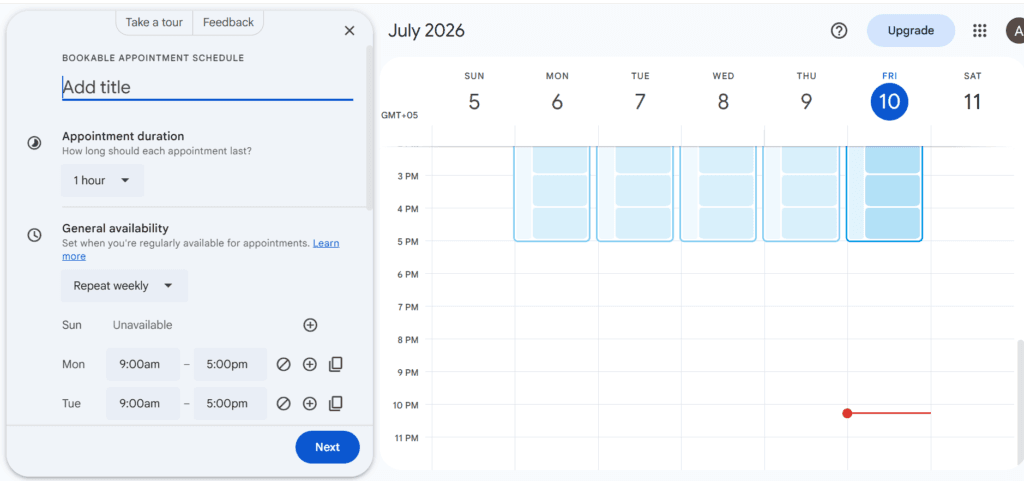
The core Calendly mechanic — a public booking page where clients pick a slot from your real availability — now exists inside Google Calendar. Open Calendar, click Create, and choose Appointment schedule: you set your available hours, get a shareable booking page, and bookings land straight on your calendar with invites sent automatically. That is the exact feature a basic Calendly seat is paying for, already included in the Workspace subscription running your email.
Where they don’t
Calendly still clearly wins on team scheduling: round-robin routing between team members, collective availability across several calendars, workflow automations around bookings, and deeper integrations with CRMs and payment tools. A sales team distributing inbound calls across five reps is using features Google’s version does not have.
The verdict
If Calendly seats exist so individual people can share a booking link, Google Calendar’s appointment schedules cover you — walk through creating one before your next Calendly renewal and see if anything is missing for your use. If you rely on round-robin routing or booking workflows, that is Calendly’s real product and worth keeping.
Pair 4 — Notion + Asana
What each tool costs
Notion Business is $15 per user per month billed annually. Asana Starter is $13.49 per user per month billed annually (verified July 2026). Both billed for a 10-person team together: about $285 a month.
Where they overlap
Both hold projects, tasks, assignees, and due dates. Notion’s databases can be shaped into boards and timelines that look and behave a great deal like Asana’s, and for many teams the overlap in day-to-day use is nearly total.
Where they don’t
The structures underneath are different. Asana is built around task dependencies, workload views, and deadline-driven structure — it assumes your projects have a critical path. Notion is built around documents that contain tasks — it assumes your work is knowledge with actions attached.
The verdict
Here is the dividing line that actually decides it: if your client work runs on deadlines and dependencies — deliverables that block other deliverables, launch dates, capacity planning — Asana’s structure earns its seat price and Notion cannot honestly replace it. If what you call project management is actually shared documentation with task lists attached — meeting notes, briefs, checklists — Notion alone covers you and the Asana bill is the overlap. Look at how your team used both tools last week and one of those two sentences will describe you.
Pair 5 — Typeform + Google Forms
What each tool costs
Typeform Basic is $29 per month (verified July 2026, and consistent with the figure in our n8n form workflow guide). Google Forms is free with any Google account.
Our n8n form workflow guide
Where they overlap
Both collect structured responses through shareable forms and feed the results into a spreadsheet. For internal use — team surveys, event signups, simple intake — the two products do the same job, and one of them costs $348 a year.
Where they don’t
Typeform’s one-question-at-a-time format, design polish, and logic jumps produce a noticeably better experience for the person filling the form in. When the form is the first thing a prospective client touches — a discovery questionnaire, a project intake — that polish is part of your first impression. Google Forms looks like what it is: free.
The verdict
If your forms face clients, Typeform is buying presentation and that can be worth $29 a month on its own. If your forms are internal, Google Forms does the identical job for nothing — and it connects to the same automation workflows. Split the difference honestly: many agencies need exactly one client-facing Typeform and can move everything else to Forms.
Pair 6 — Toggle + your PM tool’s built-in time tracking
What each tool costs
Toggl Track Starter is $9 per user per month billed annually ($10 billed monthly, verified July 2026). Time tracking also ships inside several PM tools — but check which tier: in Asana, native time tracking sits on the Advanced plan, not Starter.
Where they overlap
If your PM tool’s tier includes time tracking, both products let a team member start a timer on a task and report hours by project and client. The data ends up in the same place your projects already live, with no second app and no separate export.
Where they don’t
Toggl is a better pure time tracker: one-click timers everywhere via the browser extension, idle detection, and reporting that finance teams actually like. And the overlap only exists at all if you are on a PM tier that includes tracking — an agency on Asana Starter would need to upgrade to Advanced to replace Toggl, which can cost more than Toggl does.
The verdict
Run the tier math for your specific stack before deciding. If you are already paying for a PM tier with built-in tracking, Toggl is likely the overlap and a week’s trial of the built-in timer will confirm it. If replacing Toggl means upgrading your PM plan, keep Toggl — cutting a $9 tool by buying a $25 tier is the audit failing at arithmetic. If invoicing clients by the hour is your business model, our invoice follow-up workflow pairs naturally with whichever tracker survives.
Our invoice follow-up workflow
How to check a pair you suspect
The six pairs above are the common ones, but the method works on any pair you suspect in your own stack:
- List what you actually use tool A for — from its usage logs or your last two weeks of activity, not from memory. Memory lists the features you liked at signup; usage lists the two you touch.
- Open tool B’s feature list against that usage list, line by line. You are not comparing the products — you are checking whether B covers your actual A.
- Run one real week of that work through the survivor before cancelling anything. Paper parity and practice parity are different things, and a week costs nothing.
- Check the export options on the tool you plan to cut before you cut it. Getting your data out is always easier while you are still a customer.
If a suspected pair turns into a suspicion about the whole stack, our full agency stack audit walks through the complete version of this process — every tool, every seat, one afternoon.
15-minute SaaS audit checklist
The honest limitations
Feature parity on paper is not parity in practice. A replacement that covers 80 percent of what you used the old tool for sounds like a win until the missing 20 percent turns out to be the part your best client depends on. That is why every verdict above is conditional and why the one-week trial step is not optional — the trial is where the invisible 20 percent shows itself, safely.
And everything here decays. The prices, tier boundaries, and included features in this article were verified from live vendor pages in July 2026 — the Loom section alone shows how much a pricing model can shift in a single year. Before acting on any pair, open both pricing pages yourself and confirm the numbers still hold. If they have moved, the four-step method still works; only the arithmetic changes.
